
7 things you should know before creating your Shopify store

Mujer revisando un paquete con el móvil junto a un portátil y cajas de envío

Opening a Shopify store takes an afternoon: you sign up, choose a theme and upload three products. Getting that store to sell is another story. Almost everything that decides whether it works is settled before you create your Shopify store: what you sell, how much it costs you each month, how you organize the catalog and who is going to run it once it’s live. These are the seven things worth having clear before you start, with the most repeated mistake in each one. Prices and tax rules are the ones for Spain, as an example.

Quick summary

KeyWhat you decideThe usual mistake
1. What you sell and to whomCatalog, margin and customerOpening the store “to see if it sells”
2. Real monthly costPlan, apps, fees and when it pays offLooking only at the plan price
3. Catalog structureCollections, variants and product page fieldsDesigning before organizing
4. The themeA theme designed for your productChoosing it by the demo photos
5. Payments, shipping and taxesGateway, shipping rates, VAT and legal textsDiscovering European VAT with the first sale to France
6. Mobile and speedPhotos, apps and page weightTesting the store only on a computer
7. The day afterWho manages it and howDepending on someone to change a price

1. What do you sell and to whom, before choosing a platform?

The platform is the last thing to be decided, even if it’s the first thing people search for on Google. Before that come three questions: what you’re going to sell (how many products, with which variants, whether there are digital products), at what margin, and who is going to buy it from you.

A five-product store with customers who already know you is nothing like a five-hundred-item catalog that has to find new people. The first needs little more than a good product page and a good checkout; the second, filters, search and a thought-out structure. Write it down on one page. If it doesn’t fit, the store won’t solve it either.

2. How much does a Shopify store really cost per month?

The plan price is the easy part. In Spain, the Basic plan costs €24 a month if you pay the year upfront and about €36 if you pay month by month; the next one, Grow, ranges between €79 and €105. But the real bill has more lines:

  • The plan. Basic is enough for most stores starting out.
  • The fee per sale. With Shopify Payments you pay a percentage plus a fixed amount for each card order, and the percentage goes down on higher plans. If you prefer another gateway, Shopify adds its own surcharge: 2% on Basic, 1% on Grow and 0.6% on Advanced.
  • The apps. Reviews, shipping, invoices, subscriptions. Many are free to start with; others charge every month and pile up without you noticing.
  • The domain. About €10–20 a year.
  • The theme. Free or paid, with a one-time payment.

Add it all up before thinking about the design. That figure is what your store has to pay every month, whether it sells or not.

When does going online pay off?

The math is simple: your fixed monthly costs divided by what you clear on each order. The result is the number of orders you need just to not lose money.

An example with round numbers, so the math is visible (yours will be different):

  • Fixed costs: €36 plan + €30 apps + €2 domain = €68 a month.
  • Margin per order: you sell at €40, the product costs you €18, the shipping you absorb is €5 and the payment fee is around €1.50. You’re left with about €15.50.
  • Orders to cover costs: 68 ÷ 15.50 ≈ 5 orders a month.

If you’ve also invested in setting up the store, spread it over time: €2,970 over two years is about €124 a month, and the figure rises to about 13 orders a month. Up to there, the store pays for itself. Beyond that, it starts to earn.

It pays off when there’s enough margin per order, a product people buy again or recommend, and some way of bringing in visits: customers you already have, social media, a newsletter, a physical shop. It doesn’t pay off, yet, if you sell four products, have nobody to show them to or the margin comes to two euros. In that case it’s better to start by selling through social media, on a marketplace or to order, and open the store when that math works out.

3. How do you organize the catalog before designing?

The design can be changed in an afternoon. The catalog structure can’t. Before uploading products, decide:

  • Collections: how the customer is going to search: by type, by use, by brand or by season. In Shopify a collection is just a group of products: you can have as many as you need, but each one has to have a reason.
  • Variants: size, color, format. Shopify supports up to three options per product, so if your product needs more, it has to be thought through before importing.
  • Product page fields: the data the customer really looks up, such as material, measurements, origin or ingredients. In Shopify they’re stored as metafields, so they can be filtered and always shown in the same place instead of being buried in the description.

If your products have something or someone behind them — an author, a winery, an artist, an ingredient — it’s worth giving it a page of its own with all its products underneath. That’s exactly what our themes Parker and Parker Open do.

4. Which Shopify theme should you choose?

The most common mistake is choosing the theme by the demo photos. The demo is set up with studio photos and four perfect products; your store isn’t. Look at other things:

  • That it’s designed for a catalog like yours: few products with a lot of story, or many with filters.
  • That the product page has room for the data your customer needs.
  • That it works well on mobile without tricks.
  • That it can be changed from the Shopify editor, without touching code for every little thing.
  • That it has updates and someone behind it.

Shopify’s free themes are a solid base to start with, and the paid ones in the Theme Store are paid for once and usually bring more sections. There are also themes designed for a specific type of product: Parker, our theme for bookshops and publishers, and Parker Open, for stores whose products have an origin to tell, such as music, art, courses, collectibles, food, fashion or health. Both are free if you install them yourself.

5. What needs sorting out in payments, shipping and taxes?

It’s the least glamorous part and the one that causes the most scares.

  • Payments. Shopify Payments is Shopify’s own gateway and avoids the external-gateway surcharge. If you prefer another, you can use it, but add that surcharge to every sale.
  • Shipping. Define the rates before launching: flat rate, free above a certain amount, by weight or by zone. And count the packaging, which also costs money.
  • VAT. In Spain the standard rate is 21%, with reduced rates for some products. If you sell to consumers in other EU countries, as long as those sales don’t exceed €10,000 a year you apply Spanish VAT; above that, you apply the VAT of each destination country, and you can declare it all together through the One-Stop Shop (OSS) at Spain’s tax agency.
  • Legal texts. Legal notice, privacy, terms of sale and returns. In the EU the customer has 14 days to withdraw from an online purchase. Shopify provides templates, but they have to be adapted to your business.

6. Why do mobile and speed matter?

Google indexes the mobile version of websites: what it sees on mobile is what counts for appearing in its results. And it measures the experience with three indicators, the Core Web Vitals: that the main content loads in under 2.5 seconds (LCP), that the page responds to a tap in under 200 milliseconds (INP) and that nothing jumps around while loading (CLS below 0.1).

In Shopify, what weighs most is usually what you add yourself:

  • The photos. Shopify serves them resized, but it’s best to upload them already cropped and at a reasonable size.
  • The apps. Some load their code on every page, even if you only use them on one.
  • The decorations. Sliders, videos on the home page and chained pop-ups.

Test the store on your phone, on mobile data and not on the office wifi. If it drives you mad, it’ll do the same to the customer.

7. Who is going to run the store the day after?

A store isn’t finished the day it’s published: that’s where it starts. Someone has to upload products, change prices, answer orders, prepare campaigns and check that everything works. Before launching, decide who is going to do it and make sure they know how to do it without asking for help with every change.

Shopify has a clear advantage here: hosting, security and updates are on them, so technical maintenance is much lower than in a WooCommerce store. We explain it with numbers in how much work each type of website asks of you per month. And for the day-to-day, AI already helps with quite a few tasks: you’ll find it in managing your Shopify store with AI.


How we do it at Mister Mikel

We build Shopify stores from start to finish: catalog, design, payments, shipping and training so you can run it yourself. A complete store starts at €2,970 + VAT. If your product fits one of our themes — Parker for books, Parker Open for products with an origin — you can install it yourself for free, or ask us to install it and adapt it to your catalog, with a separate quote well below a complete store. It’s all at Shopify online stores.

Frequently asked questions

How much does it cost to open a Shopify store?

Opening it, not much: the Basic plan costs between €24 and €36 a month in Spain, depending on whether you pay yearly or month by month, plus the domain and the apps you need. What changes the figure is the setup: doing it yourself, installing a theme and adapting it, or commissioning the complete store, which at Mister Mikel starts at €2,970 + VAT.

Do you need to know how to code to have a Shopify store?

No. Products, prices, orders, discounts and most design changes are done from the admin and the theme editor. Code only comes up when you want something the theme doesn’t include.

Shopify or WooCommerce?

Shopify, if you want a store you can run without a technician: hosting, security and updates are included. WooCommerce gives more freedom, but demands more maintenance. We compare them in depth in Shopify or WooCommerce for a publisher.

Can an existing store be moved to Shopify?

Yes. Products, customers and orders can be migrated from WooCommerce, PrestaShop and other platforms, and it’s worth redirecting the old URLs so you don’t lose your search rankings.

How long does it take to have a Shopify store ready?

It depends mostly on the catalog. A simple store, with the catalog prepared, can be ready in a few weeks. What takes the most time isn’t the design, but getting the photos, the texts and the product data ready.

Keep reading


Sources

Shopify theme for publishers: what Parker does with a book catalog

Imagen de tienda online

In 2025, 89,107 titles were published in Spain with an average print run of 3,374 copies, 4.1% less than the previous year, and the catalog in print reached 983,209 titles (FGEE, Avance del Comercio Interior del Libro 2025). Translated: more books, shorter print runs and a backlist that grows every year. A publisher selling on its own website needs the store to understand authors, backlist and technical details, not sizes and colors. Parker is a Shopify theme built on that premise, and this article explains what it does under the hood, what it solves in a publisher’s day-to-day and what it leaves out on purpose.

Quick summary

FeatureWhat it solves for a publisherUsual mistake
The starting pointGeneric themes are made for size and color; a book has an author, an ISBN and a backlistChoosing a theme by the photo on the sample home page
The author as an entityAuthor page with bio, quote and all their titles, without duplicating the text on every bookPutting the biography in each product’s description
Book page with metadataISBN, pages, edition, year, genre and author in their own fields, not in a paragraphWriting it all in the body of the description
Ordering by editorial criteriaA recommendations page that sorts by the editor’s rating, not by salesLetting Shopify sort by “best selling”
Backlist and new releases at onceCarousels, book of the month and recommendations with an author → genre → catalog fallbackTreating the backlist as dead stock on a dead-end page
Books and merch side by sideMulti-select filters, a size guide only when the product has oneSetting up two stores or forcing merch into a book template
Two style versionsClassic and Contemporary: same features, different typography and colorChasing the design through a hundred options in the customizer
What it doesn’t doReviews, wishlist, back-in-stock alerts and email marketing go through appsPaying for a theme expecting it to bring the whole ecosystem

Why does a generic theme fall short with a book catalog?

Because Theme Store themes are designed for products with size, color and variants, and a book has none of that: it has an author, a publisher, a collection, an ISBN and a publication year that doesn’t expire.

In practice, Shopify’s review team validates themes against T-shirt catalogs. There’s no native concept of an author, nor of a curated editorial collection. So any publisher that sets up its store with a generic theme ends up doing the same thing: it puts the technical details inside the description, repeats the author’s biography across the twelve books they’ve published and gives up on filtering by genre because the genre was never stored anywhere queryable.

Price doesn’t help you compete either. In Spain, Ley 10/2007 on reading, books and libraries fixes the retail price and limits the retailer’s discount to 5%. A publisher isn’t going to win on its website by being cheaper than Amazon: it can only win because its website explains its books better.

In the store this means: what sets a publisher’s store apart isn’t the cart, it’s the data structure underneath.

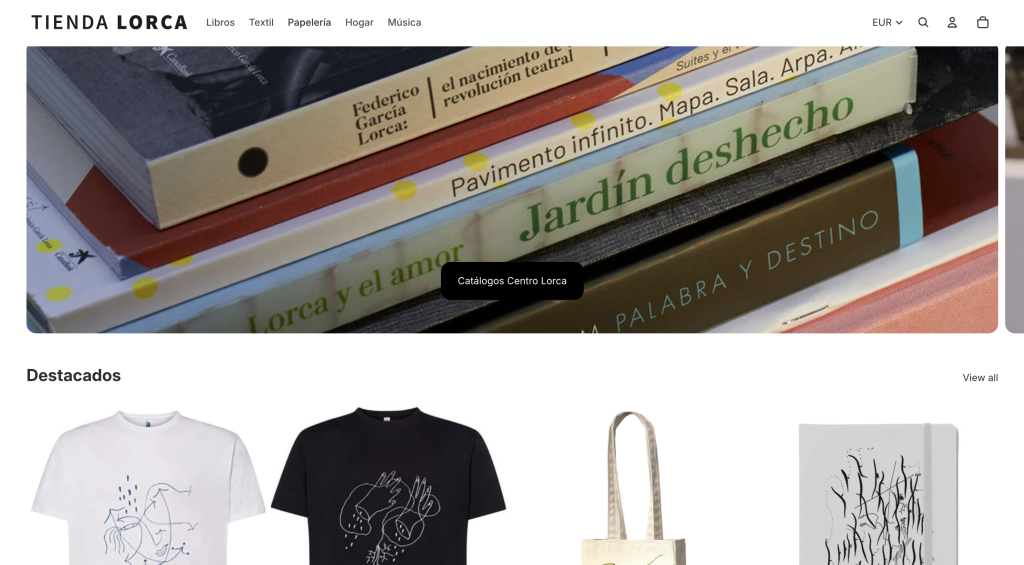
That mix isn’t theoretical. In the Centro Federico García Lorca’s store, T-shirts, notebooks, fans and tote bags bearing the poet’s stamp live side by side, and its own team has run it since launch: how we built a cultural center’s store. A cultural catalog is more like a publisher’s catalog than it seems; the object changes, not the structure.

What does Parker do with the author that other themes don’t?

It treats the author as an entity with a page of their own, fed from a single place.

Each author is a collection with its own template. The page is split into two columns: on one side, portrait, name, biography, a quote and a footer with the number of published titles and the share link; on the other, their books, with sorting that can be changed without reloading the page. On each book’s page there’s a “Meet” band that reads the description straight from the author’s collection. It’s written once. If a date in the bio is corrected, it’s corrected everywhere.

That works for an imprint with four authors and for one with eighty. And it turns the author’s name into an indexable page, which is exactly what someone is looking for when they heard about a book on a podcast and can’t remember the title.

In the store this means: a publisher stops having a catalog of products and starts having a catalog of authors with books inside.

How do you build a book page that isn’t one loose paragraph?

By taking the technical details out of the description and putting them in their own fields.

Parker uses metafields for author, publication year, genre, ISBN, page count and edition. The product page places the cover at a large size and, underneath, a band with that data in order, separate from the back-cover text. They’re two blocks with two different jobs: one persuades and the other informs.

The difference isn’t aesthetic. According to Shopify’s documentation, a metafield is queryable data: you can filter by it, sort by it and display it wherever needed. A paragraph inside the description is text and nothing more. The same thing written in the right place can be used to build filters, recommendations and new pages; written in the convenient place, it’s good for nothing but being read.

In the store this means: the time invested in filling in metafields is recovered the first time someone wants to filter by genre.

Can the catalog be ordered by editorial criteria and not by sales?

Yes, and it’s one of the reasons the theme exists.

Out of the box, Shopify sorts by newest, price or best selling. None of the three is a publisher’s criterion. Parker includes a recommendations page that sorts by a 1-to-5 rating set by the editor, with secondary sorting by year and a genre filter. It’s the digital equivalent of the new-releases table: someone decides what goes in front and why.

The recommendations at the bottom of each book page follow the same logic, with a cascading fallback: first other books by the same author; if there are none, from the same genre; if not those either, from the catalog. And the section is labeled according to what it’s showing, “By the same author” or “In the same genre”, so the reader knows why they’re being shown that.

In the store this means: the editor’s judgment stops living in a conversation and starts living in a catalog field.

What about the backlist, the books that aren’t new releases?

They get a place on the home page, not just in a search box.

The FGEE figure makes it clear: the catalog in print grows and the average print run falls. The backlist is no longer an archive, it’s most of the business. Parker’s home page is built with a hero, book carousels with a heading and arrows, a “book of the month” section with a quote and direct purchase without leaving the page, and pairs of banners for campaigns. Each of those blocks can point to a book from six years ago just as easily as to one from last week.

Search keeps up: predictive from the header, and multi-select filters in collections, which on mobile open full screen instead of sitting in a dropdown nobody touches.

In the store this means: the backlist is rescued by placing it, not by waiting for someone to search for it.

How do you sell books and merch in the same store without it jarring?

With templates that adapt to the product instead of forcing the product to adapt.

Almost every publisher ends up selling something that isn’t a book: a tote bag, a T-shirt, a print. The classic problem is that the book template asks for an ISBN and the merch template asks for sizes. In Parker the size guide appears as a link and a pop-up only if that product has the field filled in; if it doesn’t exist, there’s no trace of it. The technical-details blocks work the same way. The cover becomes a product photo without changing templates.

The store also takes care of the places nobody looks at until they’re needed: an empty cart with a message and a way out, a collection with no results with a suggestion, and account, password and gift card pages with the same design as the rest. All in Spanish and English, translated both in the store and in the customizer.

In the store this means: a publisher doesn’t need a second store to sell a T-shirt.

Why two style versions and not one theme with a thousand options?

Because a theme with a thousand options always ends up in the same place: a store that looks like a draft.

Parker comes in two packages that are identical in features and different in skin. Classic comes with Bodoni Moda typography, a cream background and a terracotta accent; it’s the register of the traditional literary imprint. Contemporary comes with Jost, a white background, light blue surfaces, navy text and gold as a highlight; it works better for non-fiction, essays and younger catalogs. You choose one and work within it.

Each section accepts its own color scheme, and the header can be set to dark, light or white, so there’s room for fine-tuning. But the room is limited on purpose, and the contrasts in both versions have been checked so the text really reads on each background, not just in the presentation screenshot.

In the store this means: you decide the tone once, at the start, and then spend the time on the books.

What doesn’t Parker do?

It doesn’t bring an ecosystem, and it’s better to know that before rather than after.

Reader reviews, wishlists, back-in-stock alerts and email marketing aren’t part of the theme: they go through apps, because that’s how Shopify works. Setting up Search & Discovery so that metafield filters appear in the store is the merchant’s job, with their permissions. And the catalog’s metafields have to be filled in: the theme displays them gladly, but it doesn’t make them up.

In the store this means: the theme solves the structure and presentation of the catalog; the rest of the business is still the business’s.

books from an independent publisher

How we do it at Mister Mikel

Parker can be used in three ways. If you install it yourself, it’s free: you ask for it by email at info@mistermikel.com and we send it with its two styles and the installation guide. If you’d rather have us install it and adapt it to your catalog, that’s a separate quote, well below a full store. And if you want the whole store — we define the metafields, import the books with their data filled in and leave authors and collections working before talking about colors — it starts at €2,970 + VAT. We work with publishers, bookshops and cultural centers in Spanish and English, and the theme came out of building real bookstores and tripping over the same things several times. You can see it running in the Parker demo, with everything it includes on the theme page, and the plans at online stores for publishers.

Frequently asked questions

What’s the difference between a metafield and a tag for classifying a catalog?

A tag is a word stuck to the product: it’s good for grouping and little else. A metafield is a field with a defined type — number, text, date, reference to another object — and that lets you sort by it, filter it and reuse it in different templates. For a book catalog the difference is practical: with tags you can set up a “crime fiction” collection; with metafields you can sort that collection by publication year and show the ISBN on the book page. Tags age badly as the catalog grows; fields don’t.

Why are collection and category confused, and why does it matter for a publisher?

Because in almost everyone’s head an editorial collection is an imprint within the imprint — a line with its own criteria and design — and in Shopify a collection is simply a group of products. They’re two things with the same name. It matters because the Shopify collection is the piece used to build author pages, genres and editorial lines: if it’s used as a catch-all, later there’s no way to tell an author from a summer promotion. It’s worth deciding from the start what type each collection is and marking it.

When is it worth adapting an existing theme and when starting from scratch?

It’s worth adapting when the catalog’s structure resembles the theme’s: products with variants, short product pages, little hierarchy. It’s worth starting from something made for books when there are authors with several titles, a backlist that has to be kept alive and technical details readers really consult. The warning sign is the moment you start writing in the description what should be a field: at that point the theme is already asking for something else. Redoing that later costs more than choosing well at the start.

What should you have ready before importing the catalog into Shopify?

Five things, in this order. The metafields defined — author, year, genre, ISBN, pages, edition — because importing without them forces you to go back over the whole catalog afterwards. The author collections created, with the biography written just once in each. The genre decided as a closed list, not as free text. The editorial rating for the titles you want to highlight, even if only for the first twenty. And the merch identified separately, with its size guide, so it doesn’t inherit the book template. With that, the import takes a short while; without it, it’s weeks of going back over things.

Is Parker free?

Yes, if you install it yourself: you ask for it by email and receive it with its two styles and the installation guide. What has a price is having us install and adapt it (a separate quote, well below a full store) or having us build the whole store (from €2,970 + VAT. More details on the Parker page.

What if I don’t sell books?

That’s what Parker Open is for, Parker’s sister theme: instead of authors, each artist, teacher, origin, brand or ingredient has its own page with its products underneath. It works for music, art, courses, collectibles, food, fashion and health, and it’s also free if you install it yourself.

Keep reading

Sources

  • Federación de Gremios de Editores de España (FGEE), Avance de resultados del Comercio Interior del Libro en España 2025, June 2026 (in Spanish).
  • Ley 10/2007, de 22 de junio, de la lectura, del libro y de las bibliotecas (Spain’s fixed price and discount limit).
  • Shopify documentation on metafields and metaobjects.
  • Agencia del ISBN, register of titles published in Spain.

Key concepts in publishing ecommerce: a glossary for selling books online

Glosario de conceptos clave para vender libros online — Mister Mikel

Digital books already account for 5.6% of the Spanish publishing sector’s revenue (€174.39 million in 2025, 5.3% more than the previous year), according to the preliminary Domestic Book Trade Report from the Federación de Gremios de Editores (FGEE), Spain’s publishers’ federation. And bookshops account for 60.6% of sales, which leaves almost 40% of the market outside them. Selling books online has its own vocabulary, half from the book trade and half from ecommerce. This glossary brings together the twenty concepts you need to understand before opening (or fixing) a publisher’s online store, with Spain as the example.

Quick summary

ConceptIn one sentence
Fixed book priceThe publisher sets the retail price and nobody can lower it by more than 5%, not on the web either
Print runCopies printed of an edition; the average in Spain is 3,374
PreorderSelling the book before printing it to match the print run to real orders
ISBN13-digit code that identifies each edition; essential on the book page
MetadataThe book’s data (title, author, ISBN, subject, synopsis) that feed the book page
DILVEMetadata database for Spanish books, managed by the FGEE
DistributorIntermediary that gets the book to bookshops in exchange for a percentage of the retail price
Sale or returnSystem by which the bookshop returns what it doesn’t sell
Backlist and new releasesWhat has been in the catalog for a while versus what has just come out
RemaindersBooks that leave the fixed price once the periods set by law have passed
Ebook and DRMDigital book and the system that limits copying it
PODPrint on demand: it’s printed when someone buys it
Pack or bundleSeveral books sold together at a combined price
Product pageA book’s page in the store; the most important of all
CollectionA grouping of books that works as a category in the store
Payment gatewayThe service that charges the card, Bizum or PayPal
VAT on books4%, print and digital
Flat-rate shippingA fixed shipping price regardless of weight or order amount
Import CSVFile used to upload hundreds of books at once
Direct salesSelling from the publisher’s website with no distributor or bookshop

The book and its catalog

Fixed book price

In Spain the retail price of a book is set by the publisher and is the same at any point of sale. This is established by Ley 10/2007, the law on reading, books and libraries, which allows a maximum discount of 5% to the public (and 10% on Book Day and at book fairs). It applies the same in a physical bookshop as in an online store. In the store this means a 15% coupon on new releases is illegal even if the platform lets you create it.

Print run

The print run is the number of copies printed of an edition. According to the FGEE, the average print run on paper in Spain fell in 2025 to 3,374 copies per title, 4.1% less than the previous year. In the store this means every direct sale weighs more: with short print runs, the margin on a book sold without intermediaries can be double that of one sold in a bookshop.

Preorder

A preorder is the sale of a book before it physically exists, with an announced delivery date. It serves to get paid before printing and to match the print run to real demand instead of estimating it. In the store it’s set up as a normal product with an availability date and a clear notice of when it ships. We explain it in depth in Book preorders: how to fund a print run before printing.

ISBN

The ISBN (International Standard Book Number) is the 13-digit code that identifies a specific edition of a book: the same title in hardcover, paperback and ebook has three different ISBNs. In Spain it’s managed by the Agencia del ISBN. In the store it must appear on each book’s page, because it’s what search engines, comparison sites and libraries use to identify it.

Metadata

Metadata is all the information that describes a book: title, subtitle, author, ISBN, publisher, collection, subject, page count, format, publication date, retail price and synopsis. It’s the raw material of the product page. In the store, complete and consistent metadata is the difference between uploading 300 titles in an afternoon or in three weeks.

DILVE

DILVE is the platform for distributing information on Spanish books, managed by the FGEE, where publishers register their titles’ metadata so it reaches bookshops, distributors and platforms. In the store, if the publisher already feeds DILVE, that file is the starting point for importing the catalog without retyping anything.

Distributor

The distributor is the company that stores the publisher’s books, supplies them to bookshops and manages payments and returns. In exchange it keeps a percentage of the retail price which, added to the bookshop’s, usually exceeds half the price. In the store this means direct sales leave the publisher a much higher margin, but also that you have to decide what is sold on the web and what is left to the trade channel.

Sale or return

Sale or return is the system by which the bookshop receives books without buying them outright and returns the ones it doesn’t sell, usually after a few months. The return is that flow back, which the publisher receives as copies (sometimes damaged) and not as money. In the store it doesn’t exist: a book sold online is paid for and doesn’t come back, except when the buyer withdraws within 14 days.

Backlist and new releases

A new release is the recently published book, the one that occupies the bookshop table for a few weeks. The backlist is everything else: the titles that have been in the catalog for a while and keep selling little by little. In the store, the backlist is the big opportunity: bookshops don’t have room for it, and the web does. Many publishers sell online mostly what’s no longer on the tables.

Remainders

A book becomes a remainder when the publisher decides to take it out of the fixed price, something Spanish law allows once certain periods have passed since its publication and since the last supply. From then on the price is free. In the store, remainders are the only legal way to offer big discounts on books, and a well-made remainders section sells.

The digital book

Ebook and DRM

An ebook is a book in digital format, usually EPUB or PDF. DRM (Digital Rights Management) is the system that limits copying it: “hard” DRM (Adobe-style) requires an app and an account to read it; social DRM or watermarking simply includes the buyer’s details in the file. In the store, selling your own ebooks with a watermark is simpler and causes the reader fewer problems; we cover it in How to sell ebooks from your own website.

POD (print on demand)

Print on demand means printing a copy only when someone buys it, with no prior print run or warehouse. It costs more per unit than a print run, but it eliminates stock risk. In the store it lets you keep the whole backlist alive without a single copy on the shelf: the order comes in, it’s printed and it ships.

Online bookstore

The sale

Pack or bundle

A pack is a set of books sold as a single product at a combined price. Since the fixed price applies to each book, the pack can’t be a disguised discount; it can be a way to sell the whole collection or to combine a book and an object (notebook, print, tote bag). In the store, the pack raises the average order value, which is the hardest number to move for a publisher.

Collection

The collection is the publisher’s grouping of books by a common criterion: genre, format, author, series. In the store it’s the natural navigation category, and the way for someone who buys one title to see the others in the same series. A publisher’s store is organized by collections, not by “all books”.

Direct sales

Direct sales means selling the book from the publisher’s website to the end reader, with no distributor or bookshop. It leaves much more margin and gives the publisher the data on who buys. In the store you have to decide what is offered direct (preorders, backlist, packs, ebooks) so that it adds to the bookshop channel instead of competing with it.

VAT on books

VAT on books in Spain is 4%, for both print and digital formats. In the store it has to be set up as a reduced rate, and you need to check that prices are shown with VAT included, which is how the law requires them to be sold to the public.

The store

Product page

The product page is a book’s page within the store: cover, title, author, price, buy button, availability, synopsis, technical details and related books. It’s the page someone lands on from Google and the one that decides whether they buy. In a publisher’s store, a well-resolved product page is worth more than the home page.

Payment gateway

The payment gateway is the service that charges the buyer and transfers the money to the publisher: card, Bizum, PayPal, Apple Pay. In Shopify it comes built in (Shopify Payments); in WooCommerce it’s installed (Redsys, Stripe). In the store, offering Bizum in Spain visibly raises conversion among buyers who don’t want to get their card out.

Flat-rate shipping

A flat rate is a fixed shipping price, regardless of the weight or the order amount. For books it’s usually low (two or three euros) and is combined with free shipping above an amount that nudges people to buy two. In the store, shipping decides more purchases than design does: a twelve-euro book with five euros of shipping doesn’t sell.

Import CSV

The CSV is a text file with columns (title, price, ISBN, description…) that the platform uses to create hundreds of products at once. Each platform has its own column template. In the store it’s the way to upload a whole catalog from the distributor’s spreadsheet or from DILVE, instead of page by page; in Shopify it’s done from Products → Import. How to prepare it is in How to create an online store for a publisher, step by step.

How we apply it at Mister Mikel

Mister Mikel is a web design and online store studio based in Vitoria-Gasteiz, Spain, specializing in publishers, bookshops and cultural centers. Each of these twenty concepts is a decision that comes up at some point in a project: what to sell direct, how to import the catalog, how to set up the fixed price and VAT, what shipping to charge. If you want to know how it translates to your publishing house, here is the service page.


Frequently asked questions

What’s the difference between a preorder and crowdfunding for a publisher?

A preorder sells a book that has already been decided: there’s a title, a date and a fixed price, and the reader buys a copy. Crowdfunding finances a project that may not happen, with rewards and free pricing, and usually on an external platform. For a publisher with its own store, the preorder is simpler (it’s one more product, with 4% VAT and the fixed price in Spain) and keeps the buyer’s data in-house. Crowdfunding makes sense when the book needs a community that doesn’t exist yet.

Why are backlist and remainders confused, and why does it matter in the store?

The backlist is the catalog that has been published for a while and is still at the fixed price; a remainder is a book the publisher has taken out of the fixed price and that can be sold at a free price. They get confused because both are “old books”, but the difference is legal: in Spain you can’t apply more than a 5% discount to the backlist; to remainders, whatever you like. In the store it’s best to keep them in separate sections so you don’t discount by mistake what can’t be discounted.

Can a publisher sell on its website and in bookshops at the same time without problems with the distributor?

Yes, and it’s the usual arrangement. The fixed price guarantees that the website doesn’t compete on price with the bookshop. What makes the coexistence work is dividing the roles: the publisher’s own store focuses on preorders, backlist, packs, ebooks and special editions, and new releases on paper keep reaching bookshops through the distributor. Many publishers state it explicitly on their website with an “also at your bookshop”.

When does print on demand pay off compared with a print run?

When expected sales don’t cover the minimum that makes a print run profitable, or when the book is backlist and only a few copies sell each month. POD costs more per unit and limits some finishes, but it eliminates warehousing, returns and the risk of being left with boxes. For new releases with sales expectations, a print run is still cheaper; for keeping the backlist alive without stock, POD wins.

Which concepts do you need to understand before importing the catalog into the store?

Four that are linked: metadata (the book’s data), the ISBN (which identifies each edition and avoids duplicates), DILVE (where many Spanish publishers already have that metadata registered) and the import CSV (the file the platform uses to turn it into product pages). If the metadata is complete and each edition has its ISBN, the CSV is prepared in an afternoon and the product page comes out right the first time.


Keep reading


Sources

  • FGEE, Avance del Informe de Comercio Interior del Libro 2025 (June 2026, in Spanish)
  • Ley 10/2007, de 22 de junio, de la lectura, del libro y de las bibliotecas (Spain’s law on reading, books and libraries)
  • Agencia del ISBN (Spain)
  • DILVE, book metadata platform (FGEE)

How to create an online store for a publisher, step by step

Proceso de creación de una tienda online para una editorial en seis pasos — Mister Mikel

Bookshops and bookshop chains account for 60.6% of book sales in Spain, according to the preliminary 2025 Domestic Book Trade Report from the Federación de Gremios de Editores (FGEE), Spain’s publishers’ federation. The other 39.4% is sold outside bookshops, and the average print run has already fallen to 3,374 copies per title. With print runs like that, every direct sale counts double: it doesn’t go through a distributor’s or a bookshop’s discount. Creating an online store for a publisher takes six steps. Here they are, in order, with what has to be decided at each one and what usually goes wrong.

Quick summary

StepWhat gets decidedThe usual mistake
1. What the store sellsNew releases, backlist, preorders, ebooks, or everythingOpening “to sell everything” and selling nothing
2. PlatformShopify, WooCommerce or anotherChoosing by license price, not by who is going to run it
3. CatalogBook pages, metadata, images, importUploading 300 titles by hand and getting to 80
4. Price, VAT and shippingFixed price, 4% VAT, shipping ratesOffering a 10% discount (it’s illegal in Spain)
5. DesignHome, collections, book page, legal pagesCopying a big publisher’s store
6. Launch and managementPayments, emails, preorders, day-to-dayLaunching and not touching the store for six months

Step 1: Decide what the store sells (and what it doesn’t)

A publisher’s online store doesn’t have to sell the whole catalog. It has to sell what the bookshop can’t: the preorder, the limited edition, the backlist that’s no longer in distribution, the ebook, the collection bundle. The FGEE counts 983,209 titles in print in the Spanish catalog; a small publisher’s is two hundred, and of those, thirty make up 80% of sales.

The question this step answers: what does someone buy on your website that they wouldn’t buy at their local bookshop? If the answer is “the same thing but with shipping costs”, the store isn’t going to work. If it’s “the book before anyone else” or “the whole collection at a collection price”, it will.

You also have to decide the relationship with bookshops. Selling direct isn’t competing with them if you don’t break the price (you can’t, see step 4) and if the store is the place for what they don’t have. Many publishers state it explicitly on their website: “you’ll also find us at your bookshop”. It adds, it doesn’t subtract.

A tip: make a list of ten titles to start with. The ones with a story, the ones people ask about, the ones in preorder. The rest gets uploaded later, when there’s already a store to show.

Step 2: Choose the platform

For a small or mid-sized publisher, the real decision is between Shopify and WooCommerce. Both sell books. The difference is who is going to run it and how much you want to know about servers.

Shopify is a monthly subscription: payments, hosting, security and updates are included. WooCommerce is free on top of WordPress, but you provide the hosting, the maintenance and the paid plugins. We explain it in depth in Shopify or WooCommerce for a publisher?, with a migration case included.

The criterion we use: if the store is going to be managed by the publisher (uploading books, running preorders, changing texts) without a technician alongside, Shopify. If there’s already a WordPress site with content, someone who maintains it and a budget for plugins, WooCommerce makes sense.

A tip: decide with whoever is going to upload the books, not with whoever is going to build the store. Building it takes three weeks. Running it takes years.

Step 3: Prepare the catalog

The catalog is 70% of the work in a publisher’s store and the step that delays the most projects. Every book needs: title, author, ISBN, collection, format, page count, retail price, synopsis, a good-resolution cover and, if there is one, the publication date.

A good part of that data already exists. If the publisher registers its titles in DILVE (the metadata database the FGEE manages for the Spanish book trade), that file is the starting point. If not, the distributor’s spreadsheet usually has almost everything. From there you prepare a CSV with the columns the platform imports, and upload them all at once. In Shopify, from Products → Import. Three hundred titles go in over an afternoon.

Covers are the other bottleneck. They need a minimum size (1,000 px wide works), JPG or WebP format and the same framing across all of them. If there are 300 covers in 300 different sizes, the store looks like a flea market even if the design is good.

A tip: organize by collection from day one. Collection, author and format as categories. It’s what lets someone who buys one title see the other nine in the same series.

Step 4: Set up the fixed price, VAT and shipping

In Spain the price of a book is fixed by law. Ley 10/2007, the law on reading, books and libraries, establishes that the publisher sets the retail price and that the maximum discount to the public is 5%. That applies on the web too. A 15% coupon on new books is illegal, and the platforms don’t know it: they let you create it.

What you can do: a discount of up to 5%, free shipping above a certain amount, collection bundles at a bundle price, and free pricing on remaindered books (under the conditions the law sets), used books and non-book items.

VAT on books in Spain, print and digital, is 4%. It has to be set up as a reduced tax in the platform, and you need to check that the price shown includes VAT, which is how books are sold to the public.

On shipping: books are heavy and people won’t pay five euros of shipping for a twelve-euro book. Publishers that sell well online have a low flat rate (two or three euros), free shipping above an amount that nudges people to buy two, or pickup at the publisher’s own premises or at a friendly bookshop.

A tip: measure a real book, weigh it and ask two carriers for rates before setting the shipping price. Shipping is decided by the margin, not by the platform.

Step 5: Design the store

A publisher’s store needs five well-made pages, not fifty. Home, collections, book page, about us, and the legal ones (legal notice, privacy, terms of purchase, cookies). Everything else is optional.

The book page is the most important page and the one that’s usually in the worst shape. A reader arriving from Google at a specific book needs to see, without scrolling: cover, title, author, price, buy button, availability and a synopsis that isn’t the back-cover blurb. Underneath: the technical details (pages, format, ISBN, collection), and other books by the author and in the collection.

The home page isn’t a shop window for the whole catalog. It’s one new release, a preorder if there is one, three collections and a sentence that says which publisher this is. In the case of the Centro Federico García Lorca we solved it like this: few categories, a clean product page, and a store its own team could run with no agency behind it.

A tip: don’t copy Planeta or Anagrama. Their store sells a brand; yours sells specific books to specific people. Fewer pages, a better book page.

Step 6: Launch and manage

The store launches when four things work: payment (card, Bizum if possible, PayPal), the order confirmation email, the shipping calculation and the terms of purchase page. The rest gets improved with the store open.

The preorder is the tool that pays off most for a publisher online: it gets you paid before printing and matches the print run to real demand. It has its own logic of dates, advance payment and communication; it’s explained in Book preorders: how to fund a print run before printing. Ebooks, with automatic download after payment, are covered in How to sell ebooks from your own website.

And then comes management, which is where stores die or live. Uploading new releases, changing the shipping text, answering readers. A good part of that is handled today with an AI assistant at your side; we cover it in Managing your Shopify store with AI.

A tip: put one day a month in the calendar for the store. New releases, a bundle, a preorder. A publisher’s store that’s updated once a month sells; one that was last updated at launch doesn’t.

Process for creating an online store for a publisher in six steps — Mister Mikel

How we do it at Mister Mikel

Mister Mikel is a web design and online store studio based in Vitoria-Gasteiz, Spain, specializing in publishers, bookshops and cultural centers. These six steps are our working process, in the same order. We start with step 1 in a one-hour call, and the store is usually up and running in three or four weeks. What we deliver includes the imported catalog, the fixed price and VAT setup, and a session so the publisher can manage it without us. If you want to know what it would look like in your case, here is the service page.


Frequently asked questions

How much does it cost to create an online store for a publisher?

It depends on the platform and the catalog. Shopify costs from €24 a month on its basic plan, paid yearly, plus a fee per sale; WooCommerce has no license but requires hosting and paid plugins. Design and launch with a professional, with the catalog imported and everything configured, usually comes to between €2,000 and €5,000 depending on the number of titles and the features (preorders, ebooks, distributor integration).

Can a publisher sell its books at a discount on its website?

Only up to 5%, which is the maximum allowed by Spain’s book law, Ley 10/2007. The fixed price applies on the web just as it does in the bookshop. You can offer free shipping, collection bundles or free pricing on remaindered books, used books and non-book products.

What VAT applies to a book in an online store?

In Spain, 4%, for both print and digital formats. It has to be set up as a reduced rate in the platform, and prices are shown with VAT included.

How long does it take to set up a publisher’s online store?

With the catalog prepared (data and images), between three and four weeks. What causes the most delay is the catalog: gathering metadata, good-resolution covers and original synopses. If that’s ready, the store moves fast.

Shopify or WooCommerce for a publisher?

Shopify if the store is going to be managed by the publisher itself without a technician. WooCommerce if there’s already a WordPress site maintained by someone and a budget for hosting and plugins. Both sell books; the difference lies in who runs it afterwards.


Keep reading


Sources

  • FGEE, Avance del Informe de Comercio Interior del Libro 2025 (June 2026, in Spanish)
  • Ley 10/2007, de 22 de junio, de la lectura, del libro y de las bibliotecas (Spain’s law on reading, books and libraries)
  • DILVE, book metadata platform (FGEE)
  • Shopify documentation: importing products by CSV

Managing your Shopify store with AI (and when not to)

Managing a Shopify store with AI isn’t pressing a button and having the store run itself. It’s no longer asking “how do I change this?” every time you need to upload a product, set up a discount or edit an email. Most of a store’s day-to-day tasks you can handle yourself, with ChatGPT or Claude at your side, in less time than it takes to write to your developer. And a few you can’t. This article is about telling one kind from the other.

What “managing with AI” really means

There are two ideas of AI in ecommerce that get mixed up and have nothing to do with each other.

One is the AI you’re sold: automatic recommendations, chatbots that answer on their own, prices that change with the weather. That exists, it costs money and in a small store it’s almost never worth it.

The other is more boring and far more useful: using an assistant to do what you already do, but without getting stuck. Writing 40 product pages in an afternoon. Understanding why the discount isn’t applying. Turning the catalog PDF into a CSV that Shopify swallows without complaining.

Here we’re going with the second. We’ll leave the first for when you’re turning over enough for it to matter.

The pattern we always see

A store works. It sells. And every two weeks the same message arrives: “hey, how do I change the text on the shipping page?”, “can you upload these three books for me?”, “the discount code isn’t working”.

It’s not a problem with the store. It’s that managing Shopify involves a hundred small tasks and nobody explained how they work. So you react: something happens, you ask, you wait, it gets solved. And while you wait, the store stays the same.

With an AI assistant in front of you, half of those questions disappear. Not because the AI knows more than your developer, but because it’s available at eleven at night and you’re not embarrassed to ask it the same thing three times.

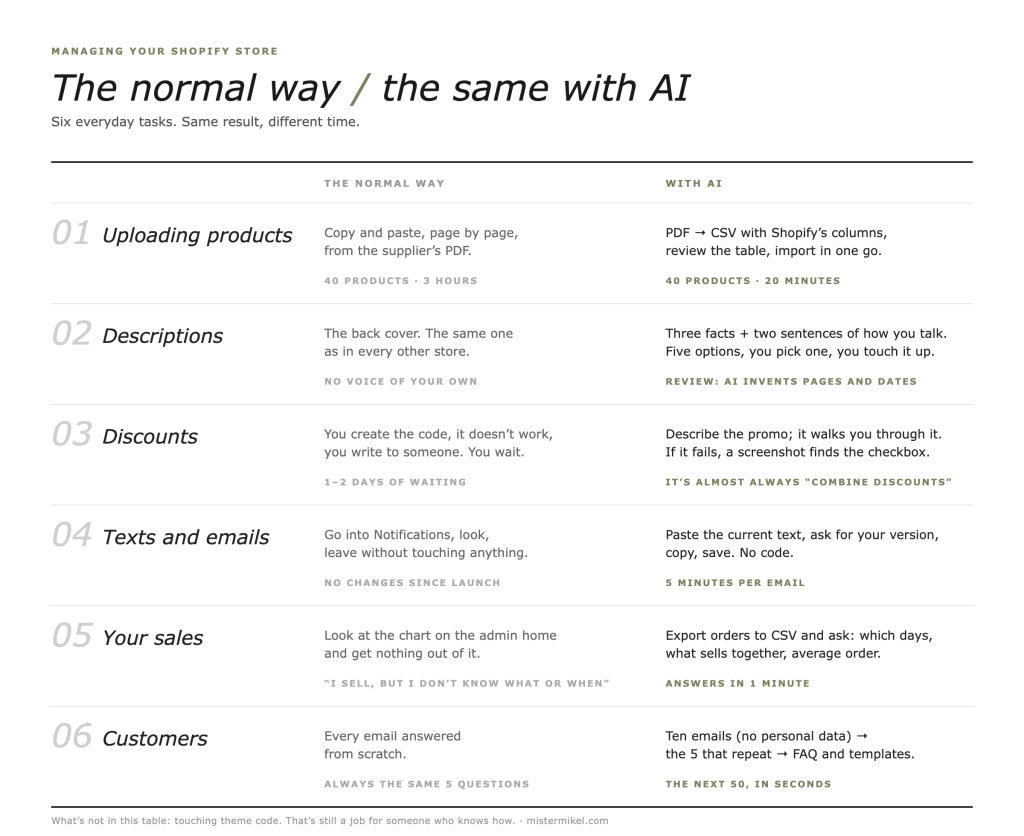
The everyday tasks: the normal way and the AI way

What to do in a Shopify store managed with the help of AI — Mister Mikel

Uploading new products

The normal way: you open each product page, copy the title, price and description from the publisher’s PDF, paste, adjust, next. Forty products, three hours, two pricing errors.

With AI: you give the catalog PDF to the assistant and ask for a CSV with Shopify’s exact import columns (Title, Body HTML, Vendor, Price, SKU, whichever you use). You review the table and import from Products → Import. Forty products, twenty minutes. You catch the errors in the table before they exist.

Writing descriptions

The normal way: copying the back cover. Every store has the same back cover.

With AI: you give it the title, three facts about the product and two sentences showing how you talk. You ask for five short descriptions, pick one and touch it up. Shopify has its own assistant (Shopify Sidekick, inside the admin), but most people end up in ChatGPT: it’s more intuitive, it understands your tone better if you show it, and it isn’t limited to what it knows about the admin.

Careful: always review. AI invents page counts, measurements and edition dates with astonishing confidence.

Discounts, codes and promotions

The normal way: you create the code, it doesn’t work, you write to someone.

With AI: you tell it what you want (“15% off the whole X collection from the 1st to the 15th, not combinable with free shipping”) and ask it to tell you step by step where that’s configured in your admin. If it still doesn’t work, you paste a screenshot of the setup and it tells you which checkbox is wrong. Nine times out of ten it’s the “combine with other discounts” checkbox.

Changing page and email texts

The normal way: fear. Going into Settings → Notifications and leaving without touching anything.

With AI: you paste in the current text of the confirmation email and ask for a version in your voice. Copy, paste, save. There’s no code to break. The same goes for the shipping page, the returns page or the “about us” page.

Understanding your sales

The normal way: looking at the chart on the admin home page and getting nothing out of it.

With AI: you export the last three months’ orders to CSV, hand it over and ask normal questions: “which days do I sell most?”, “which products go together in the same order?”, “what’s my average order value?”. Answers in a minute. This alone changes how you decide the discounts from the previous point.

Customer service

The normal way: answering every email from scratch.

With AI: you give it ten real customer emails (with no personal data) and it pulls out the five questions that keep coming up. You write those five answers once, and put them on an FAQ page and in reply templates. The next fifty you answer in seconds.

Where AI gets you into trouble

This is where the article stops being friendly.

Touching theme code. An assistant will give you Liquid code with total confidence. Sometimes it works. Sometimes it breaks the checkout on a Friday afternoon. If you’re going to try, duplicate the theme first (Online Store → Themes → Duplicate) and work on the copy. And if you don’t know what Liquid is, this task isn’t yours.

Apps that do “everything”. AI will recommend apps by name. Many no longer exist, others have the same name but are something else, and almost all charge a monthly fee. Check the Shopify App Store before installing anything.

Customer data. Don’t paste real names, addresses or emails into an external assistant. Anonymize first. It’s common sense and, in Europe, it’s also the law.

Business decisions. AI will tell you to raise prices, offer free shipping or open a TikTok channel with the same confidence for all three. It’s good for putting your data in order, not for deciding for you.

How to know if this is for you

If you recognize yourself in three of these, yes:

  • You write to your developer more than twice a month for things that take five minutes.
  • You have products not yet uploaded because “it’s a pain”.
  • Your store’s descriptions are the book’s back cover or the supplier’s product sheet.
  • You haven’t touched a notification email since the store was built.
  • You know you’re selling, but you don’t know what or when.

If you recognize yourself in none, congratulations: either your store is very well set up or you have someone running it. Both are fine.

How we do it

At Mister Mikel we design Shopify online stores for publishers, bookshops, foundations and cultural centers, from Vitoria-Gasteiz, Spain. And there’s one thing we do in all of them: we hand the store over with a “how it’s done” document and a session so the client knows how to manage the day-to-day without us.

It sounds odd for a studio to teach you not to need it. The logic is simple: if every small change goes through us, the store moves at our pace, not yours. And what we want is for it to move.

For what isn’t day-to-day (theme changes, integrations, a new campaign page, migrating large catalogs) we have the development subscription: €950 a month, with no minimum term, for stores that need someone to be there without hiring anyone. You do the small stuff with your assistant. We do the structural stuff. Each to their own.

One more thing: don’t ask AI to be your store

The temptation is to let the assistant write everything. Every product page, every email, every post. The result is a store that sounds like all the others, because all the others are using the same assistant.

Use it for the heavy lifting. The voice is still yours. A book description written by someone who has read the book shows. And in a small store, that it shows is the only advantage you have.


FAQ

Can I manage my Shopify store with ChatGPT without knowing how to code?

Yes, for almost everything that isn’t code: uploading products, writing product pages, setting up discounts, changing page and email texts, analyzing sales and preparing replies to customers. Anything that involves touching the theme (Liquid files, CSS, checkout) still needs someone who knows what they’re doing or, at the very least, a copy of the theme so you don’t break the live store.

Should I use Shopify Sidekick or ChatGPT?

Shopify Sidekick is the assistant built into the Shopify admin: it answers questions about your store and takes you to the setting you’re looking for. It’s good for getting started. ChatGPT (or Claude) is more intuitive for the day-to-day: it understands your tone if you give it examples, works with files (PDF catalogs, order exports) and you can ask it the same thing three ways until you get it. In practice, clients who manage their store well use ChatGPT to think and the Shopify admin to execute.

Is it safe to paste my store’s data into an AI?

Product data (titles, prices, descriptions), yes. Customer data (names, emails, addresses, identifiable orders), no, unless you anonymize it first. Export, remove the personal columns and then ask. It’s what the GDPR requires and, besides, you don’t need that data to draw useful conclusions.

When do I stop needing a developer if I use AI?

For the day-to-day, fairly soon. For structural work, never entirely: theme changes, integrations with your invoicing system, catalog migrations, new campaign pages. The difference is that you stop paying to change a text and pay for what really needs someone.


Keep reading

An online store for a cultural center: what we learned with the Centro Lorca

Tienda online del Centro Federico García Lorca, diseñada por Mister Mikel

An online store for a cultural center isn’t a normal store with nice products: it’s a catalog with meaning, international sales almost by default and a non-technical team that has to be able to run it on its own. We learned all of that building the store for the Centro Federico García Lorca in Granada, Spain — tiendalorca.es — and this article tells how. At Mister Mikel we build online stores for publishers, bookshops, foundations and cultural centers from Vitoria-Gasteiz, Spain, and this project sums up better than any argument why we do it the way we do.

The starting point

The Centro Federico García Lorca has one of the most distinctive cultural merchandise collections in Spain: T-shirts, notebooks, fans, tote bags — all bearing the poet’s stamp. They had the product, they had the audience and they had the brand. What they didn’t have was an online store.

And they had a clear requirement from day one, the one that defines everything else: they wanted to be able to manage it themselves. Changing a price, adding a product, launching the season’s new items — without depending on anyone, without calling an agency, without waiting.

That requirement, which sounds logistical, is actually the most important design decision in the project.

The decisions that mattered

We built the store from scratch on Shopify, and along the way we made the decisions we now apply to every cultural project:

Catalog by collection, not by product type. The temptation was to organize it like a bazaar: T-shirts on one side, stationery on the other. But a cultural catalog is explored by meaning, not by format — collections group what tells the same story, and the visitor browses like someone walking through an exhibition.

Product pages that say more than the measurements. A T-shirt with a screen-printed verse doesn’t compete with a chain-store T-shirt; it competes on meaning. If the product page only says size and composition, you’ve thrown away the only advantage you had. We worked on the product pages so they would tell where each piece comes from.

International by design, not as a patch. Lorca’s audience doesn’t end in Spain — the store was prepared to sell in several markets, including sales in dollars. For a cultural institution with an international reach, multi-currency isn’t an extra: it’s a part of the audience that, without it, looks and leaves.

An admin panel anyone can handle. There was one handover criterion: that anyone on the team could add a product without technical training. We achieved it, and since then the store has been run by their team.

What we learned (and apply to every cultural project)

The transferable lessons, in plain terms:

  • Self-management is decided at the start, not at the end. An “easy to use” store doesn’t happen by accident: every structural decision is made thinking about who will touch it afterwards.
  • Cultural products sell with context. A product page with no story, a product with no advantage.
  • Collections are the map. A cultural catalog is organized the way the institution’s narrative is organized, not like a warehouse.
  • International is prepared even if it doesn’t launch on day one. Changing your mind later costs three times as much.
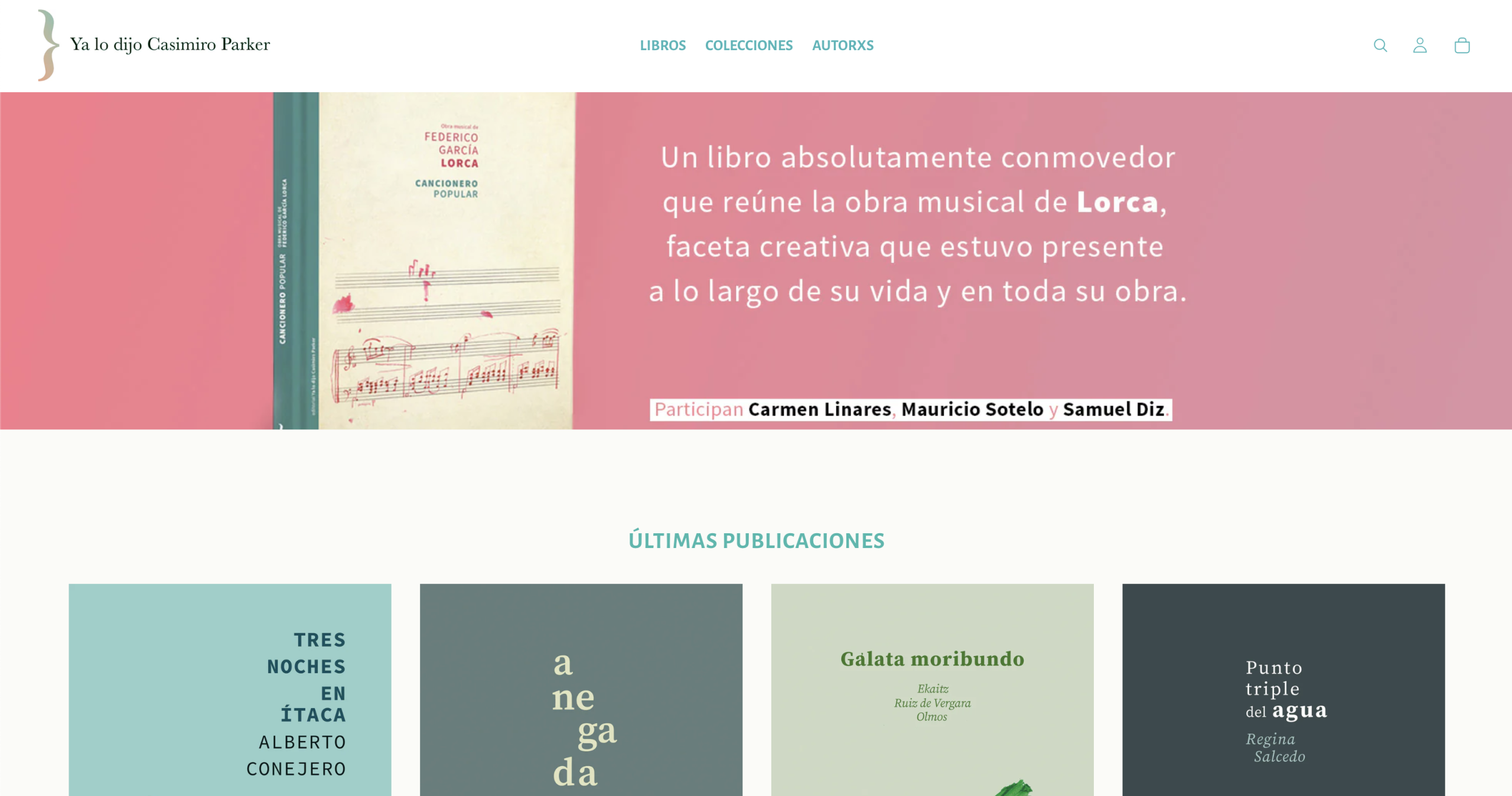
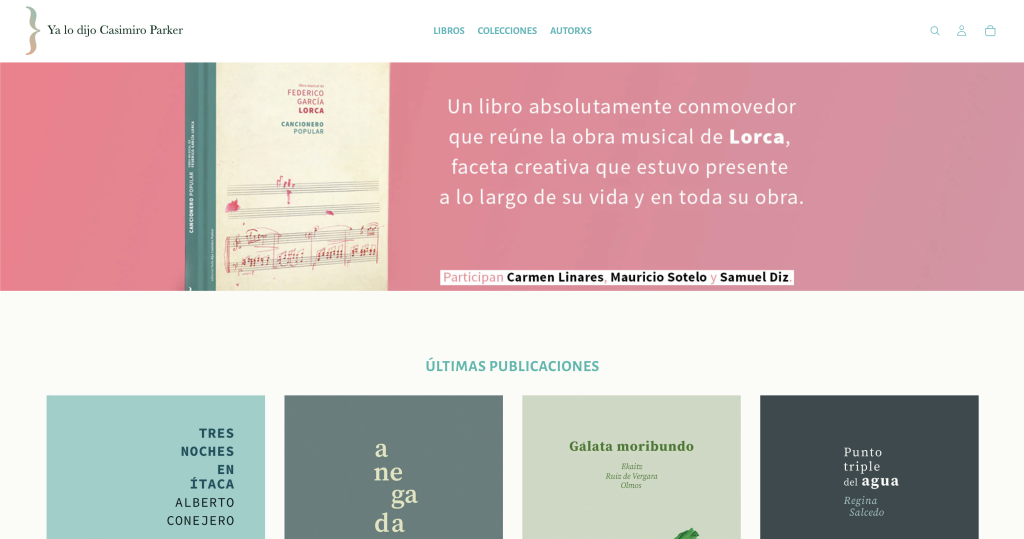
  • A big institution doesn’t mean an impossible project. And a small imprint doesn’t mean a toy store: the same method worked for Ya lo dijo Casimiro Parker, an independent publisher in Madrid with more than a hundred titles. Two extremes, the same logic.

Does this work for my foundation / museum / bookshop?

If your project sells things with meaning — publications, cultural merchandise, tickets to activities — and your team isn’t technical, yes: it’s exactly the case we work for. Plans range from €2,970 to €6,860 + VAT depending on catalog, languages and international scope; the details are on our page about online stores for publishers and cultural projects and the price breakdown is in how much does an online store for a publisher cost.

If what you sell is mostly books, we build the store on Parker, our Shopify theme for publishers and bookshops. If your center also sells courses, art or music, there’s Parker Open. Both are free if you install them yourself.

And if your doubt comes earlier — whether it’s even worth leaving the marketplace or manual selling — start with how to sell books online without depending on Amazon.


FAQ

What’s the difference between a normal online store and one for a cultural center?

Three things: the catalog is organized by meaning (collections that tell a story, not warehouse categories), product pages need context because the product is bought for what it represents, and international sales tend to matter from the start. And a fourth that cuts across all of them: the team managing it is usually not technical, so the store has to be runnable without training.

Can an institution’s team manage its store without technical knowledge?

Yes, if the store is built with that criterion from the design stage. In the case of the Centro Federico García Lorca, the requirement was that anyone on the team could add a product or change a price without technical training, and that’s how it has worked since handover.

Can cultural merchandise be sold to other countries?

Yes. Languages, currencies and shipping zones are configured according to the project’s markets. The Centro Lorca store, for example, also sells in dollars.

How much does an online store for a foundation or cultural center cost?

Our plans range from €2,970 to €6,860 + VAT: from a simple catalog in one language to international sales with multi-currency, migration of large catalogs and a members’ area. If there’s a grant or subsidy involved, we adapt the project’s scope to what it covers.

Can the store also sell publications and tickets to activities?

Yes, from the same platform: books, publications, merchandise, and tickets to launches or activities as one more product, with their confirmation and attendee list. Without sending your audience to an external platform.


In short

A cultural center’s online store comes down to three decisions: catalog by collection, product pages with context and self-management by the team from day one — with international prepared even if it doesn’t launch on the first day. It’s what we learned building tiendalorca.es for the Centro Federico García Lorca, and the same method works from the independent imprint to the large institution.

Keep reading

Book preorders: how to fund a print run before printing

Preventa de libros: cómo financiar una edición antes de imprimir

A book preorder means opening sales of a title before it physically exists: the reader pays today and receives the book when it comes off the press. For an independent publisher it’s probably the most underrated tool there is: you get paid before paying the printer, you know how many to print before deciding the print run, and you measure real interest in a title without betting the house. At Mister Mikel we build online stores for publishers and cultural projects from Vitoria-Gasteiz, Spain, and preorders are among the first things we set up when the project calls for them.

What exactly is a preorder and what is it for?

It’s one more product in your store, with one difference: the delivery date is in the future and the reader knows it. They buy today and receive it when the book exists. In exchange for that wait, they usually get something: a signed edition, an extra, or simply the certainty of having the title on day one.

For the publisher, the preorder solves three problems at once:

  • Cash. The money comes in before it goes out. The printer is paid, in part or in full, with sales already made.
  • Print run. You stop deciding blind how many copies to print. The reservations give you the floor; from there, you adjust.
  • Risk. If a title doesn’t spark interest in preorder, you know before printing it, not afterwards, with the boxes in the warehouse.

Why do almost no small publishers use it?

Because of the how, not the what. Everyone knows the idea; the problem is that doing it by hand — emails, bank transfers, a spreadsheet of names — is torture, and doing it on a marketplace is impossible on your terms. A preorder only works well from a store of your own, where you control the product, the date, the communication and, above all, the list of who has reserved.

That’s the usual trap: the publisher that would benefit most from preorders — the small one, the one that suffers over every print run — is the one that manages orders with a spreadsheet and half a Saturday. We talk about that cycle in how to sell books online without depending on Amazon.

How do you set up a preorder in your store?

With a well-built store, opening a preorder is a matter of a couple of clicks, not a project. The full circuit:

  1. You create the title’s page like any other product: cover (even a provisional one), synopsis, ISBN if you already have it, and the estimated delivery date clearly visible.
  2. You mark it as a preorder. The button says “reserve”, not “buy”, and the reader knows what they’re doing.
  3. You announce the window. Your newsletter — connected to the store, not in a separate tool — lets your community know. This is where the reader list you’ve been building pays back the effort.
  4. You close and adjust the print run. With the reservations in hand, you decide how many to print with data, not faith.
  5. You ship and notify. The day the book arrives from the printer, the orders are already paid and have an address. All that’s left is packing.

In our plans for publishers, preorders come in from the Grow plan (€4,985 + VAT, together with the connected newsletter — because a preorder with no reader list to announce it to is a billboard in an empty lot. The full breakdown is in how much does an online store for a publisher cost.

What mistakes ruin a preorder?

Almost always the same ones:

  • A hidden or unrealistic delivery date. Readers forgive waiting; they don’t forgive being misled about the wait. A visible date and an honest margin.
  • The eternal preorder. Without a closing date there’s no urgency, and without urgency there’s no reservation. The window has a beginning and an end.
  • No reason to reserve. If reserving today has no advantage over buying in three months, people will buy in three months. A signed edition, an extra, free shipping — something.
  • Silence until delivery. Between the reservation and the shipment there are weeks. An email saying the book is at the printer turns the wait into part of the experience.
  • Discounts you can’t offer. Careful here, there’s a law involved — next section.

And the fixed book price?

A preorder doesn’t exempt you from the fixed price: in Spain the book price is set by the publisher and the maximum discount is 5% (Ley 10/2007), in preorders too. So the incentive to reserve can’t be “30% off” — but it can be something better: a signed or numbered edition, a print, free shipping, access to the launch. Things Amazon can’t offer and you can. The limitation, looked at properly, plays in your favor.

Our view, in one sentence

The preorder is the tool that turns an online store from a shop window into a business tool: it funds editions, adjusts print runs and gives your community a reason to be on your list. It only asks for two things: a store of your own that supports it without drama and a reader list to tell about it.


FAQ

What is a book preorder?

It means opening sales of a title before it’s printed: the reader pays at the time of reserving and receives the book on the announced delivery date. For the publisher it means getting paid before paying the printer and knowing the real demand before deciding the print run.

Can you offer a discount on a book preorder?

In Spain the maximum discount on the fixed book price is 5% (Ley 10/2007), in preorders too. That’s why the incentives to reserve are usually different: a signed or numbered edition, extras, free shipping or access to the launch.

What do I need to run preorders in my online store?

A store of your own that handles products with a future delivery date and, highly recommended, a newsletter connected to the store to announce the reservation window to your community. In Mister Mikel’s plans, both come in from the Grow plan (€4,985 + VAT.

How long should a preorder last?

It should have a visible beginning and end — a closed window creates the reason to reserve today. The exact length depends on each title’s printing schedule; what matters is that the announced delivery date is realistic and is met.

Do preorders help you know how many copies to print?

Yes, and it’s one of their greatest strengths: reservations give you a floor of real demand before ordering the print run. You print with data instead of intuition, and the risk of being left with boxes in the warehouse drops dramatically.


In short

Book preorders let a publisher get paid before printing, adjust the print run with real reservations and activate its community — with the fixed book price respected (in Spain, a maximum discount of 5%) and the incentives where they really make a difference: signatures, extras and direct contact. All it needs is a store of your own that supports it and a reader list. The first is built; the second is cultivated.

Keep reading

Shopify or WooCommerce for a publisher?

¿Shopify o WooCommerce para una editorial?

Shopify or WooCommerce for a publisher? Short answer: for most publishers, bookshops and cultural projects, Shopify — because the team can manage the store without tech skills. WooCommerce wins when you need a very specific customization that Shopify doesn’t allow. At Mister Mikel we build online stores for publishers and cultural projects from Vitoria-Gasteiz, Spain, we’re members of the Shopify Partner program, and even so we’re going to tell you when we would NOT choose Shopify. No smoke.

What are they and how do they differ at the core?

Both do the same thing — a complete online store — but with opposite philosophies:

Shopify is a rental platform: you pay a monthly fee and they provide the servers, the security and the updates. You take care of selling.

WooCommerce is a free WordPress plugin: the store lives on your own hosting and the software is yours. The freedom is total — and the maintenance is yours too.

The underlying difference isn’t technical, it’s about responsibility: with Shopify, if something breaks, they fix it. With WooCommerce, you fix it (or whoever you pay to).

What does a publisher really need?

Before comparing platforms, it’s worth looking at what a publisher really asks of its store. After building stores like the one for Ya lo dijo Casimiro Parker — a Madrid imprint with more than a hundred titles in collections — and the one for the Centro Federico García Lorca — which also sells its cultural catalog in dollars — the list repeats itself:

  • Adding a new title without calling anyone
  • Book pages with ISBN and variants (hardcover or paperback, signed edition)
  • Preorders to fund editions before printing
  • Ebooks with automatic delivery
  • Collections and bundles
  • In many cases, a second language
  • And above all: that the team runs it, not a technician

Notice the detail: almost nothing on that list is exotic. It’s a well-organized catalog and friction-free management. And that’s where the scales tip.

Comparison: Shopify vs WooCommerce for selling books

What you needShopifyWooCommerce
Getting started without tech skillsYes, out of the boxWith help
Running it yourself every dayYesTakes more hands-on work
Forgetting about updates and securityYesOngoing maintenance
Very specific customizationLimitedNo ceiling
Large, complex catalogYesYes
Selling in several languages and currenciesYesWith configuration
Upfront software costMonthly feeFree (but hosting + maintenance)
Who fixes what breaks?They doYou do

When does Shopify win?

When the priority is for the store to run by itself and be managed by your team. For a publisher of two or three people, every hour you don’t spend wrestling with updates is an hour for the catalog. Shopify covers everything on the list above out of the box: ISBN on book pages, variants, preorders, ebooks, multi-currency.

WooCommerce’s “free” also comes with a catch: the software costs nothing, but the hosting, the paid plugins and the maintenance hours do. In the medium term, Shopify’s fee usually works out comparable — with the difference that the scares are theirs, not yours.

When does WooCommerce win?

Let’s be fair; that’s what we’re here for. WooCommerce is the right choice when:

  • You need a customization Shopify doesn’t allow. A very particular checkout flow, a very custom integration with a system of your own. Shopify has a ceiling; WooCommerce doesn’t.
  • You already live in WordPress and have someone to maintain it. If your publishing website has been on WordPress for years with a technical person behind it, adding WooCommerce builds on what you already have.
  • Total control of the data and the software is non-negotiable for your organization — it happens in some institutions.

If you recognize yourself there, WooCommerce. And yes, this is signed by a member of the Shopify Partner program: recommending the same tool to everyone is what a salesperson does, not a craftsperson.

And what about the fixed book price?

Neither platform constrains you here: in Spain the book price is set by the publisher and is the same in every channel, with a maximum discount of 5% (Ley 10/2007). You configure it the same way in both. The platform decision is about management, not prices.

Our view, in one sentence

For most publishers and cultural projects, Shopify wins on peace of mind: you manage it yourself and there are no scares. WooCommerce comes in when you need something very custom. And if you’re unsure about your specific case, tell us and we’ll say clearly which one fits — the plans and prices are published on our page about online stores for publishers and cultural projects, from €2,970 + VAT.


FAQ

Which is better for a publisher, Shopify or WooCommerce?

For most publishers, bookshops and cultural projects, Shopify: the team manages the store without tech skills, and updates and security are included. WooCommerce is better when you need a very specific customization or already have a WordPress site with your own technical support.

Does Shopify support ISBN, preorders and ebooks?

Yes. Each title can carry its ISBN, variants (hardcover or paperback, signed edition) are managed from the same product page, preorders open in a couple of clicks and ebooks are delivered automatically after payment.

Is WooCommerce really free?

The software is; the store isn’t. On top of free you have to add hosting, the paid plugins that are almost always needed and the hours of maintenance and updates. In the medium term, the cost is usually comparable to Shopify’s fee.

Can I change platforms later on?

Yes. The catalog can be migrated from one platform to the other, although it’s a project in itself (URLs, product pages, customers). That’s why it’s worth choosing well the first time according to your case, not according to fashion.

How much does it cost to build the store with you?

Our plans for publishers and cultural projects range from €2,970 to €6,860 + VAT, depending on catalog and languages. The full breakdown is in the article how much does an online store for a publisher cost?


In short

Shopify or WooCommerce for a publisher comes down to one question: who is going to maintain the store? If the answer is “my team, and we’re not technical”, Shopify. If it’s “I need something very custom and I have someone to sustain it”, WooCommerce. We’re members of the Shopify Partner program and even so we look at it case by case — because the platform is the means, and what matters is that your books sell and that you run the store yourself.

Keep reading

How much does an online store for a publisher cost?

Cuánto cuesta una tienda online para una editorial — Mister Mikel

An online store for a publisher costs between €2,970 and €6,860 + VAT, depending on the catalog and how far you want to go. At Mister Mikel we build online stores for publishers, bookshops, foundations and cultural centers from Vitoria-Gasteiz, Spain, and these are our published prices — not a “request a quote” that forces you into three calls to find out one figure.

This article breaks down what each plan includes, what costs exist beyond the project (the ones almost nobody mentions) and, with the same frankness, when it’s not worth building one.

What are the exact prices?

We work with three plans. The difference between one and the next isn’t “more of the same”: each plan solves a different need.

PlanPrice (+ VAT)Who it’s forWhat’s included
Basicfrom €2,970The imprint that wants to start selling without intermediariesCatalog of print books and ebooks, carefully built book pages, payments and shipping configured, one language
Grow€4,985The project with a community or a bilingual audienceEverything above + a second language (Basque, Catalan, Galician or English), preorders, bundles and collections, connected newsletter
Expand€6,860The institution or the large catalogEverything above + international sales with multi-currency, migration of a large catalog, members’ area, integrations with distributors

All of them include the same foundation: we hand over the store with the catalog loaded and show you how to use it in ten minutes. From then on you run it yourself, without calling anyone to change a price.

Why that range and not €600 or €20,000?

Because the market has two extremes and a gap in the middle. Below are the €300–800 templates: a generic store where your books look like sneakers, with empty product pages and nobody who has thought about your catalog. Above, five-figure custom builds, designed for companies with their own technical department.

A publisher needs neither. It needs a store on a solid platform, with the catalog well organized by collection, book pages that say something more than the page count, and an admin panel anyone on the team can understand. That’s what the €2,970 to €6,860 range covers.

What costs are there beyond the project?

Almost nobody mentions this on their website, and then the surprises arrive. Beyond the project, an online store has three recurring costs that you pay directly, not to us:

  • The platform subscription. Shopify works on a monthly subscription, contracted directly with them. It’s what saves you servers, updates and security scares.
  • The payment gateway fee. A small percentage per transaction, as in any business that accepts cards. You only pay when you sell.
  • The domain. A few euros a year.

And monthly maintenance with us? It’s not mandatory, and that’s exactly the idea: we build the store so you don’t need us day to day. If you get stuck, we’re still a message away.

Which plan does your project need?

Two real cases help you place yourself, one at each end:

Ya lo dijo Casimiro Parker

Ya lo dijo Casimiro Parker is an independent publisher in Madrid with almost two decades publishing poetry and fiction and more than a hundred titles in collections. Its store shows that a small imprint can have a store worthy of its catalog without a multinational’s budget.

Tienda Lorca

The Centro Federico García Lorca in Granada is at the other end: an institution with a distinctive cultural catalog that also sells outside Spain, including sales in dollars. There we’re already talking about multi-currency and a large catalog — Expand territory.

The quick rule: if you’re starting from scratch with your catalog, Basic. If you have a community, a bilingual audience or want preorders, Grow. If you’re an institution or you’re migrating a catalog of hundreds of titles, Expand. And if in doubt, tell us about your case and we’ll tell you which one fits — we reply within 24 hours.

What if I have a grant or subsidy?

We adapt the project. If you’ve been awarded a grant or are going to apply for one, we adjust the scope and the budget so it fits what the grant covers or reaches the amount you need to justify. We don’t handle the application for you, but we do structure the project to fit it — that’s what flexible-scope plans are for.

When is it NOT worth building one?

Let’s be frank; there are others for selling smoke. A store of your own isn’t worth it if:

  • You publish one title every two years and sell at launches. With that volume, a simple payment link and your newsletter do the job, with no project involved.
  • Nobody on the team is going to give it even an hour a month. We leave the store ready, but you upload the new books. If there’s nobody for that, the problem isn’t the website.
  • Your only motivation is “we have to be on the internet”. Being there doesn’t sell. Selling sells.

If you’ve recognized yourself in any of these, save your money — and if things change a year from now, we’ll still be here. For everyone else, the math is different: every sale that goes through an intermediary today leaves margin and readers there. We talk about that in how to sell books online without depending on Amazon.


FAQ

How much does an online store for a small publisher cost?

A store ready to sell print books and ebooks, with the catalog loaded and payments configured, starts at €2,970 + VAT (Mister Mikel’s Basic plan). It’s the entry point for an imprint that wants to sell without intermediaries.

What’s the difference between the €2,970, €4,985 and €6,860 plans?

Basic (€2,970) covers catalog, book pages, payments and shipping in one language. Grow (€4,985) adds a second language, preorders, bundles and a connected newsletter. Expand (€6,860) adds international sales with multi-currency, migration of large catalogs, a members’ area and integrations with distributors.

Are there monthly costs after the project?

Yes, three, and they’re paid directly to each provider: the platform’s monthly subscription (Shopify), the payment gateway’s per-transaction fee and the domain. Agency maintenance isn’t mandatory: the store is built for you to manage yourself.

How long does it take to have the store up and running?

A simple store is usually ready in a few weeks. We work in stages, with something concrete to see at each one, and we hand it over with the catalog loaded.

Can I pay for the project with a grant?

If you’ve been awarded a grant or are going to apply for one, we adapt the project’s scope and budget so it fits what the grant covers or reaches the amount to be justified. We don’t handle the application, but we structure the project to fit it.

What if I only want the theme?

Parker, our Shopify theme for bookshops and publishers, is free if you install it yourself. If you want us to install it and adapt it to your catalog, that’s a separate quote, well below the plans. The prices above are for when we build the whole store.


In short

An online store for a publisher costs between €2,970 and €6,860 + VAT depending on the plan: Basic to start selling, Grow to reach your whole community, Expand for large, international catalogs. On top of that come three recurring costs paid to the provider (platform, gateway and domain), and no mandatory maintenance: you run the store yourself. And if your volume doesn’t justify it yet, we’ll tell you just as plainly.

Keep reading

How to sell books online without depending on Amazon

libros de una editorial independiente

Selling books online without depending on Amazon is possible, legal and less expensive than it seems: an online store of your own for a publisher starts at €2,970 + VAT and is usually up and running in a few weeks. At Mister Mikel we build online stores for publishers, bookshops, foundations and cultural centers from Vitoria-Gasteiz, Spain, and this article shares what we’ve learned doing it.

The reason to take the step is simple. When Amazon sells your book, you supply the catalog and they keep the margin, the data and — this is the serious part — the relationship with your reader.

It’s not that Amazon is the devil. It’s that it doesn’t work for you.

What do you lose on every Amazon sale?

On every marketplace sale you lose three things: part of the margin, the buyer’s data and the chance to talk to them again. The discount is the least of it. The serious part is that this reader is recorded in Amazon’s database, not in yours. You can’t write to them when you release the next title in the series. You can’t invite them to the launch. For you, they don’t exist.

The difference, in a table:

Selling on AmazonSelling in your store
Margin per saleShared with the marketplaceAll yours (minus the payment fee)
Reader dataAmazon’sYours
Newsletter and communityImpossible: you don’t know who boughtEvery purchase adds a contact
PreordersYou don’t control the formatYou launch them yourself, whenever you want
Book pageStandard templateYou tell it the way you want
DependenceTheir rules, their changesYour platform, your rules

A publisher lives on two things: its catalog and its community. Giving away the second to move the first is a bad deal, especially when the alternative costs less than it seems.

What mistakes do publishers make when selling online?

We’ve been building stores for cultural projects for years, and the pattern almost always repeats:

  • Confusing “being on the internet” with “selling on the internet”. A pretty website with a PDF catalog doesn’t sell. It informs, at most.
  • The hijacked website. Someone built it years ago and today changing a price means calling, waiting and paying. The result: nobody touches it and the catalog goes stale.
  • Handling orders by hand. Emails, bank transfers, a spreadsheet and half a Saturday. It works until it stops working — usually in the middle of a preorder campaign.
  • Five tools that don’t talk to each other. The store on one side, the newsletter on another, the catalog in a third. And you in the middle, acting as the glue.

How do you know if this is you?

Three quick questions. If you answer no to any of them, you have homework:

  1. Can you change the price of a title right now, yourself, without calling anyone?
  2. Do you know the name and email of your last twenty buyers?
  3. Could you open a preorder this week if you sign off an edition tomorrow?

A well-built store of your own answers yes to all three. And we’re not talking about a pharaonic project: we’re talking about a store with your catalog in book pages that make people want to buy, payments and shipping configured, and an admin panel anyone on your team can understand.

And the fixed book price?

In Spain, the retail price of a book is set by the publisher and is the same in every channel, with a maximum discount of 5% (Ley 10/2007, the law on reading, books and libraries). This, sometimes seen as a drawback, actually plays in your favor: Amazon can’t sell your book cheaper than you do. The reader pays the same in your store as there — the difference is who keeps the margin and the contact. In your store, you do.

How do you build a store you can run yourself?

Our philosophy at Mister Mikel is short: we build it, you keep it, you run it. We build the store, leave the catalog loaded, and on handover day we show you how to use it in ten minutes. From then on you don’t need us for the day-to-day — and that, which sounds like a detail, is the heart of the matter.

A real example: Ya lo dijo Casimiro Parker, an independent publisher in Madrid with almost two decades publishing poetry and fiction and a catalog of more than a hundred titles spread across collections. We built them a store where the catalog looks after itself: new releases, backlist, collections. No intermediary platforms, no marketplace commissions, and every reader recorded in their own house, not someone else’s.

And if you’re wondering whether this also works for something bigger: the Centro Federico García Lorca in Granada sells its cultural catalog from its own store, including international sales in dollars. Same method, different scale.

What does it cost and how long does it take?

Straight to the point: a store ready to sell starts at €2,970 + VAT, and a simple store is usually up and running in a few weeks. There are three plans — €2,970, €4,985 and €6,860 — covering everything from the small imprint to the institution with a large catalog. The details are on our page about online stores for publishers and cultural projects.

An honest caveat before we finish

Leaving Amazon doesn’t mean deleting yourself from Amazon. For many publishers it makes sense to stay there as a shop window — some readers only buy there. The difference lies in where you put the center: if your main channel is your store, Amazon is an add-on that brings extra sales. If your main channel is Amazon, you are the add-on. And that position costs dearly over the years.


FAQ

Is it legal to sell my books directly from my website?

Yes. As a publisher or bookshop you can sell directly to readers from your own online store. In Spain the fixed book price applies (Ley 10/2007), so the price is the same on your website as in any other channel, with a maximum discount of 5% — what changes is the margin you keep and the relationship with the buyer.

How much does an online store for selling books without Amazon cost?

A store ready to sell starts at €2,970 + VAT. At Mister Mikel we work with three plans — €2,970, €4,985 and €6,860 — ranging from a small imprint’s simple catalog to an institution’s international, multi-currency sales.

Will I need tech skills to manage it?

No. That’s precisely the criterion we build every store by: adding a title, changing a price or launching a preorder should take a couple of clicks, without calling anyone. We show you how to run it on handover day.

Can I sell ebooks as well as physical books?

Yes. The ebook delivers itself: the reader pays and downloads it on the spot. You can sell the print and digital editions of the same title, each with its own price.

Which platform is used for the store?

For most publishers we recommend Shopify, because it can be managed without tech skills and it handles growth; WooCommerce comes in when something very custom is needed. We are members of the Shopify Partner program and advise case by case.


In short

Selling books online without depending on Amazon means having a store of your own where the catalog, the margin and — above all — the reader are yours. Thanks to Spain’s fixed book price, your price is the same as Amazon’s; what changes is who keeps the value of each sale. It doesn’t require tech skills or a multinational’s budget: a well-built store starts at €2,970 and you run it yourself.

Keep reading