
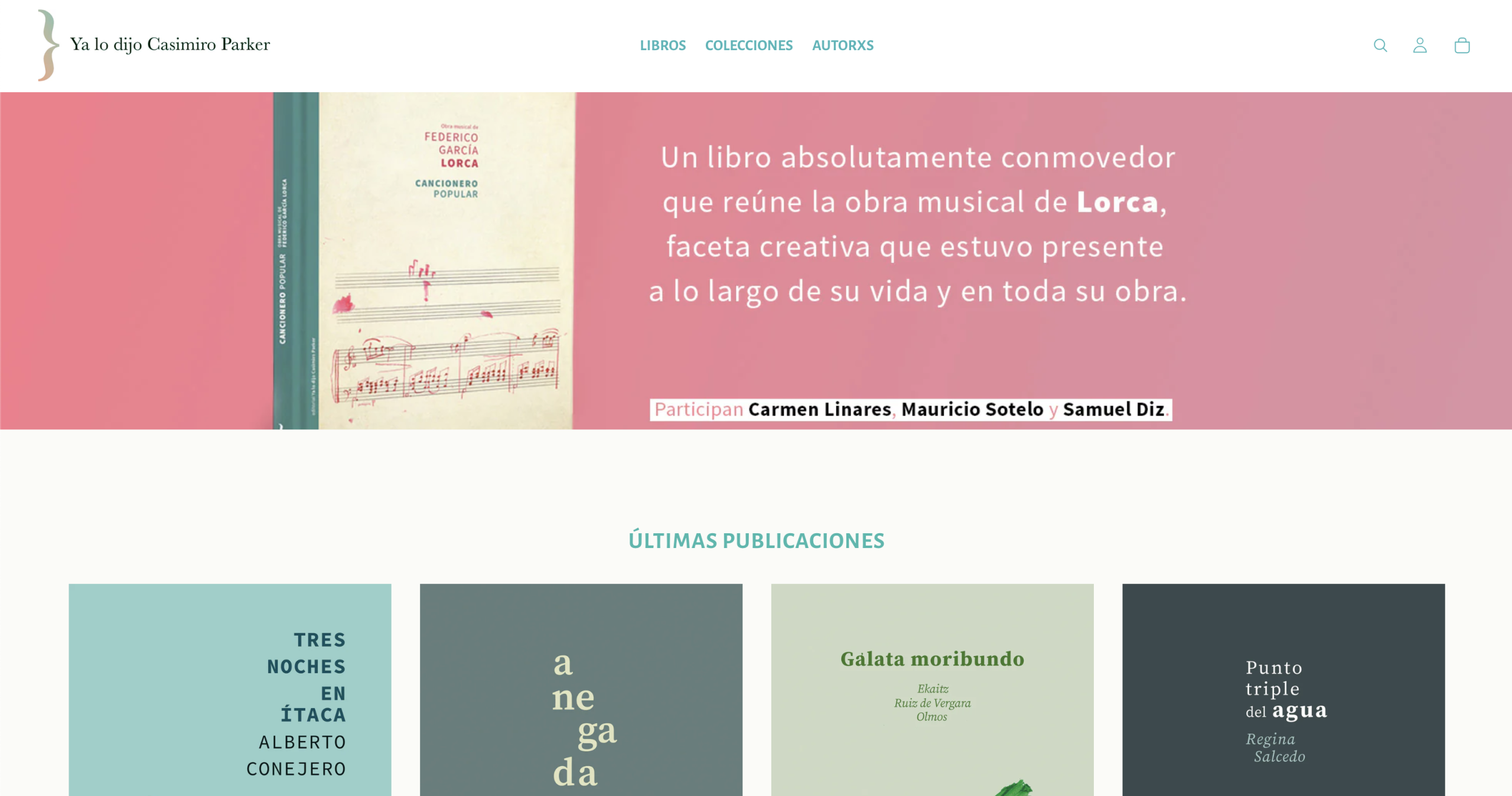
In 2025, 89,107 titles were published in Spain with an average print run of 3,374 copies, 4.1% less than the previous year, and the catalog in print reached 983,209 titles (FGEE, Avance del Comercio Interior del Libro 2025). Translated: more books, shorter print runs and a backlist that grows every year. A publisher selling on its own website needs the store to understand authors, backlist and technical details, not sizes and colors. Parker is a Shopify theme built on that premise, and this article explains what it does under the hood, what it solves in a publisher’s day-to-day and what it leaves out on purpose.
Quick summary
| Feature | What it solves for a publisher | Usual mistake |
|---|---|---|
| The starting point | Generic themes are made for size and color; a book has an author, an ISBN and a backlist | Choosing a theme by the photo on the sample home page |
| The author as an entity | Author page with bio, quote and all their titles, without duplicating the text on every book | Putting the biography in each product’s description |
| Book page with metadata | ISBN, pages, edition, year, genre and author in their own fields, not in a paragraph | Writing it all in the body of the description |
| Ordering by editorial criteria | A recommendations page that sorts by the editor’s rating, not by sales | Letting Shopify sort by “best selling” |
| Backlist and new releases at once | Carousels, book of the month and recommendations with an author → genre → catalog fallback | Treating the backlist as dead stock on a dead-end page |
| Books and merch side by side | Multi-select filters, a size guide only when the product has one | Setting up two stores or forcing merch into a book template |
| Two style versions | Classic and Contemporary: same features, different typography and color | Chasing the design through a hundred options in the customizer |
| What it doesn’t do | Reviews, wishlist, back-in-stock alerts and email marketing go through apps | Paying for a theme expecting it to bring the whole ecosystem |
Why does a generic theme fall short with a book catalog?
Because Theme Store themes are designed for products with size, color and variants, and a book has none of that: it has an author, a publisher, a collection, an ISBN and a publication year that doesn’t expire.
In practice, Shopify’s review team validates themes against T-shirt catalogs. There’s no native concept of an author, nor of a curated editorial collection. So any publisher that sets up its store with a generic theme ends up doing the same thing: it puts the technical details inside the description, repeats the author’s biography across the twelve books they’ve published and gives up on filtering by genre because the genre was never stored anywhere queryable.
Price doesn’t help you compete either. In Spain, Ley 10/2007 on reading, books and libraries fixes the retail price and limits the retailer’s discount to 5%. A publisher isn’t going to win on its website by being cheaper than Amazon: it can only win because its website explains its books better.
In the store this means: what sets a publisher’s store apart isn’t the cart, it’s the data structure underneath.
That mix isn’t theoretical. In the Centro Federico García Lorca’s store, T-shirts, notebooks, fans and tote bags bearing the poet’s stamp live side by side, and its own team has run it since launch: how we built a cultural center’s store. A cultural catalog is more like a publisher’s catalog than it seems; the object changes, not the structure.
What does Parker do with the author that other themes don’t?
It treats the author as an entity with a page of their own, fed from a single place.
Each author is a collection with its own template. The page is split into two columns: on one side, portrait, name, biography, a quote and a footer with the number of published titles and the share link; on the other, their books, with sorting that can be changed without reloading the page. On each book’s page there’s a “Meet” band that reads the description straight from the author’s collection. It’s written once. If a date in the bio is corrected, it’s corrected everywhere.
That works for an imprint with four authors and for one with eighty. And it turns the author’s name into an indexable page, which is exactly what someone is looking for when they heard about a book on a podcast and can’t remember the title.
In the store this means: a publisher stops having a catalog of products and starts having a catalog of authors with books inside.
How do you build a book page that isn’t one loose paragraph?
By taking the technical details out of the description and putting them in their own fields.
Parker uses metafields for author, publication year, genre, ISBN, page count and edition. The product page places the cover at a large size and, underneath, a band with that data in order, separate from the back-cover text. They’re two blocks with two different jobs: one persuades and the other informs.
The difference isn’t aesthetic. According to Shopify’s documentation, a metafield is queryable data: you can filter by it, sort by it and display it wherever needed. A paragraph inside the description is text and nothing more. The same thing written in the right place can be used to build filters, recommendations and new pages; written in the convenient place, it’s good for nothing but being read.
In the store this means: the time invested in filling in metafields is recovered the first time someone wants to filter by genre.
Can the catalog be ordered by editorial criteria and not by sales?
Yes, and it’s one of the reasons the theme exists.
Out of the box, Shopify sorts by newest, price or best selling. None of the three is a publisher’s criterion. Parker includes a recommendations page that sorts by a 1-to-5 rating set by the editor, with secondary sorting by year and a genre filter. It’s the digital equivalent of the new-releases table: someone decides what goes in front and why.
The recommendations at the bottom of each book page follow the same logic, with a cascading fallback: first other books by the same author; if there are none, from the same genre; if not those either, from the catalog. And the section is labeled according to what it’s showing, “By the same author” or “In the same genre”, so the reader knows why they’re being shown that.
In the store this means: the editor’s judgment stops living in a conversation and starts living in a catalog field.
What about the backlist, the books that aren’t new releases?
They get a place on the home page, not just in a search box.
The FGEE figure makes it clear: the catalog in print grows and the average print run falls. The backlist is no longer an archive, it’s most of the business. Parker’s home page is built with a hero, book carousels with a heading and arrows, a “book of the month” section with a quote and direct purchase without leaving the page, and pairs of banners for campaigns. Each of those blocks can point to a book from six years ago just as easily as to one from last week.
Search keeps up: predictive from the header, and multi-select filters in collections, which on mobile open full screen instead of sitting in a dropdown nobody touches.
In the store this means: the backlist is rescued by placing it, not by waiting for someone to search for it.
How do you sell books and merch in the same store without it jarring?
With templates that adapt to the product instead of forcing the product to adapt.
Almost every publisher ends up selling something that isn’t a book: a tote bag, a T-shirt, a print. The classic problem is that the book template asks for an ISBN and the merch template asks for sizes. In Parker the size guide appears as a link and a pop-up only if that product has the field filled in; if it doesn’t exist, there’s no trace of it. The technical-details blocks work the same way. The cover becomes a product photo without changing templates.
The store also takes care of the places nobody looks at until they’re needed: an empty cart with a message and a way out, a collection with no results with a suggestion, and account, password and gift card pages with the same design as the rest. All in Spanish and English, translated both in the store and in the customizer.
In the store this means: a publisher doesn’t need a second store to sell a T-shirt.
Why two style versions and not one theme with a thousand options?
Because a theme with a thousand options always ends up in the same place: a store that looks like a draft.
Parker comes in two packages that are identical in features and different in skin. Classic comes with Bodoni Moda typography, a cream background and a terracotta accent; it’s the register of the traditional literary imprint. Contemporary comes with Jost, a white background, light blue surfaces, navy text and gold as a highlight; it works better for non-fiction, essays and younger catalogs. You choose one and work within it.
Each section accepts its own color scheme, and the header can be set to dark, light or white, so there’s room for fine-tuning. But the room is limited on purpose, and the contrasts in both versions have been checked so the text really reads on each background, not just in the presentation screenshot.
In the store this means: you decide the tone once, at the start, and then spend the time on the books.
What doesn’t Parker do?
It doesn’t bring an ecosystem, and it’s better to know that before rather than after.
Reader reviews, wishlists, back-in-stock alerts and email marketing aren’t part of the theme: they go through apps, because that’s how Shopify works. Setting up Search & Discovery so that metafield filters appear in the store is the merchant’s job, with their permissions. And the catalog’s metafields have to be filled in: the theme displays them gladly, but it doesn’t make them up.
In the store this means: the theme solves the structure and presentation of the catalog; the rest of the business is still the business’s.

How we do it at Mister Mikel
Parker can be used in three ways. If you install it yourself, it’s free: you ask for it by email at info@mistermikel.com and we send it with its two styles and the installation guide. If you’d rather have us install it and adapt it to your catalog, that’s a separate quote, well below a full store. And if you want the whole store — we define the metafields, import the books with their data filled in and leave authors and collections working before talking about colors — it starts at €2,970 + VAT. We work with publishers, bookshops and cultural centers in Spanish and English, and the theme came out of building real bookstores and tripping over the same things several times. You can see it running in the Parker demo, with everything it includes on the theme page, and the plans at online stores for publishers.
Frequently asked questions
A tag is a word stuck to the product: it’s good for grouping and little else. A metafield is a field with a defined type — number, text, date, reference to another object — and that lets you sort by it, filter it and reuse it in different templates. For a book catalog the difference is practical: with tags you can set up a “crime fiction” collection; with metafields you can sort that collection by publication year and show the ISBN on the book page. Tags age badly as the catalog grows; fields don’t.
Because in almost everyone’s head an editorial collection is an imprint within the imprint — a line with its own criteria and design — and in Shopify a collection is simply a group of products. They’re two things with the same name. It matters because the Shopify collection is the piece used to build author pages, genres and editorial lines: if it’s used as a catch-all, later there’s no way to tell an author from a summer promotion. It’s worth deciding from the start what type each collection is and marking it.
It’s worth adapting when the catalog’s structure resembles the theme’s: products with variants, short product pages, little hierarchy. It’s worth starting from something made for books when there are authors with several titles, a backlist that has to be kept alive and technical details readers really consult. The warning sign is the moment you start writing in the description what should be a field: at that point the theme is already asking for something else. Redoing that later costs more than choosing well at the start.
Five things, in this order. The metafields defined — author, year, genre, ISBN, pages, edition — because importing without them forces you to go back over the whole catalog afterwards. The author collections created, with the biography written just once in each. The genre decided as a closed list, not as free text. The editorial rating for the titles you want to highlight, even if only for the first twenty. And the merch identified separately, with its size guide, so it doesn’t inherit the book template. With that, the import takes a short while; without it, it’s weeks of going back over things.
Yes, if you install it yourself: you ask for it by email and receive it with its two styles and the installation guide. What has a price is having us install and adapt it (a separate quote, well below a full store) or having us build the whole store (from €2,970 + VAT. More details on the Parker page.
That’s what Parker Open is for, Parker’s sister theme: instead of authors, each artist, teacher, origin, brand or ingredient has its own page with its products underneath. It works for music, art, courses, collectibles, food, fashion and health, and it’s also free if you install it yourself.
Keep reading
- How to create an online store for a publisher, step by step
- Ecommerce glossary for publishers
- Managing a Shopify store with AI
- Online stores for publishers
- An online store for a cultural center: the Lorca case
Sources
- Federación de Gremios de Editores de España (FGEE), Avance de resultados del Comercio Interior del Libro en España 2025, June 2026 (in Spanish).
- Ley 10/2007, de 22 de junio, de la lectura, del libro y de las bibliotecas (Spain’s fixed price and discount limit).
- Shopify documentation on metafields and metaobjects.
- Agencia del ISBN, register of titles published in Spain.