Bookshops and bookshop chains account for 60.6% of book sales in Spain, according to the preliminary 2025 Domestic Book Trade Report from the Federación de Gremios de Editores (FGEE), Spain’s publishers’ federation. The other 39.4% is sold outside bookshops, and the average print run has already fallen to 3,374 copies per title. With print runs like that, every direct sale counts double: it doesn’t go through a distributor’s or a bookshop’s discount. Creating an online store for a publisher takes six steps. Here they are, in order, with what has to be decided at each one and what usually goes wrong.
Quick summary
| Step | What gets decided | The usual mistake |
|---|---|---|
| 1. What the store sells | New releases, backlist, preorders, ebooks, or everything | Opening “to sell everything” and selling nothing |
| 2. Platform | Shopify, WooCommerce or another | Choosing by license price, not by who is going to run it |
| 3. Catalog | Book pages, metadata, images, import | Uploading 300 titles by hand and getting to 80 |
| 4. Price, VAT and shipping | Fixed price, 4% VAT, shipping rates | Offering a 10% discount (it’s illegal in Spain) |
| 5. Design | Home, collections, book page, legal pages | Copying a big publisher’s store |
| 6. Launch and management | Payments, emails, preorders, day-to-day | Launching and not touching the store for six months |
Step 1: Decide what the store sells (and what it doesn’t)
A publisher’s online store doesn’t have to sell the whole catalog. It has to sell what the bookshop can’t: the preorder, the limited edition, the backlist that’s no longer in distribution, the ebook, the collection bundle. The FGEE counts 983,209 titles in print in the Spanish catalog; a small publisher’s is two hundred, and of those, thirty make up 80% of sales.
The question this step answers: what does someone buy on your website that they wouldn’t buy at their local bookshop? If the answer is “the same thing but with shipping costs”, the store isn’t going to work. If it’s “the book before anyone else” or “the whole collection at a collection price”, it will.
You also have to decide the relationship with bookshops. Selling direct isn’t competing with them if you don’t break the price (you can’t, see step 4) and if the store is the place for what they don’t have. Many publishers state it explicitly on their website: “you’ll also find us at your bookshop”. It adds, it doesn’t subtract.
A tip: make a list of ten titles to start with. The ones with a story, the ones people ask about, the ones in preorder. The rest gets uploaded later, when there’s already a store to show.
Step 2: Choose the platform
For a small or mid-sized publisher, the real decision is between Shopify and WooCommerce. Both sell books. The difference is who is going to run it and how much you want to know about servers.
Shopify is a monthly subscription: payments, hosting, security and updates are included. WooCommerce is free on top of WordPress, but you provide the hosting, the maintenance and the paid plugins. We explain it in depth in Shopify or WooCommerce for a publisher?, with a migration case included.
The criterion we use: if the store is going to be managed by the publisher (uploading books, running preorders, changing texts) without a technician alongside, Shopify. If there’s already a WordPress site with content, someone who maintains it and a budget for plugins, WooCommerce makes sense.
A tip: decide with whoever is going to upload the books, not with whoever is going to build the store. Building it takes three weeks. Running it takes years.
Step 3: Prepare the catalog
The catalog is 70% of the work in a publisher’s store and the step that delays the most projects. Every book needs: title, author, ISBN, collection, format, page count, retail price, synopsis, a good-resolution cover and, if there is one, the publication date.
A good part of that data already exists. If the publisher registers its titles in DILVE (the metadata database the FGEE manages for the Spanish book trade), that file is the starting point. If not, the distributor’s spreadsheet usually has almost everything. From there you prepare a CSV with the columns the platform imports, and upload them all at once. In Shopify, from Products → Import. Three hundred titles go in over an afternoon.
Covers are the other bottleneck. They need a minimum size (1,000 px wide works), JPG or WebP format and the same framing across all of them. If there are 300 covers in 300 different sizes, the store looks like a flea market even if the design is good.
A tip: organize by collection from day one. Collection, author and format as categories. It’s what lets someone who buys one title see the other nine in the same series.
Step 4: Set up the fixed price, VAT and shipping
In Spain the price of a book is fixed by law. Ley 10/2007, the law on reading, books and libraries, establishes that the publisher sets the retail price and that the maximum discount to the public is 5%. That applies on the web too. A 15% coupon on new books is illegal, and the platforms don’t know it: they let you create it.
What you can do: a discount of up to 5%, free shipping above a certain amount, collection bundles at a bundle price, and free pricing on remaindered books (under the conditions the law sets), used books and non-book items.
VAT on books in Spain, print and digital, is 4%. It has to be set up as a reduced tax in the platform, and you need to check that the price shown includes VAT, which is how books are sold to the public.
On shipping: books are heavy and people won’t pay five euros of shipping for a twelve-euro book. Publishers that sell well online have a low flat rate (two or three euros), free shipping above an amount that nudges people to buy two, or pickup at the publisher’s own premises or at a friendly bookshop.
A tip: measure a real book, weigh it and ask two carriers for rates before setting the shipping price. Shipping is decided by the margin, not by the platform.
Step 5: Design the store
A publisher’s store needs five well-made pages, not fifty. Home, collections, book page, about us, and the legal ones (legal notice, privacy, terms of purchase, cookies). Everything else is optional.
The book page is the most important page and the one that’s usually in the worst shape. A reader arriving from Google at a specific book needs to see, without scrolling: cover, title, author, price, buy button, availability and a synopsis that isn’t the back-cover blurb. Underneath: the technical details (pages, format, ISBN, collection), and other books by the author and in the collection.
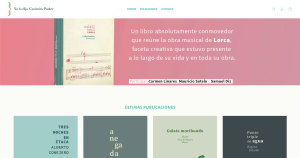
The home page isn’t a shop window for the whole catalog. It’s one new release, a preorder if there is one, three collections and a sentence that says which publisher this is. In the case of the Centro Federico García Lorca we solved it like this: few categories, a clean product page, and a store its own team could run with no agency behind it.
A tip: don’t copy Planeta or Anagrama. Their store sells a brand; yours sells specific books to specific people. Fewer pages, a better book page.
Step 6: Launch and manage
The store launches when four things work: payment (card, Bizum if possible, PayPal), the order confirmation email, the shipping calculation and the terms of purchase page. The rest gets improved with the store open.
The preorder is the tool that pays off most for a publisher online: it gets you paid before printing and matches the print run to real demand. It has its own logic of dates, advance payment and communication; it’s explained in Book preorders: how to fund a print run before printing. Ebooks, with automatic download after payment, are covered in How to sell ebooks from your own website.
And then comes management, which is where stores die or live. Uploading new releases, changing the shipping text, answering readers. A good part of that is handled today with an AI assistant at your side; we cover it in Managing your Shopify store with AI.
A tip: put one day a month in the calendar for the store. New releases, a bundle, a preorder. A publisher’s store that’s updated once a month sells; one that was last updated at launch doesn’t.

How we do it at Mister Mikel
Mister Mikel is a web design and online store studio based in Vitoria-Gasteiz, Spain, specializing in publishers, bookshops and cultural centers. These six steps are our working process, in the same order. We start with step 1 in a one-hour call, and the store is usually up and running in three or four weeks. What we deliver includes the imported catalog, the fixed price and VAT setup, and a session so the publisher can manage it without us. If you want to know what it would look like in your case, here is the service page.
Frequently asked questions
It depends on the platform and the catalog. Shopify costs from €24 a month on its basic plan, paid yearly, plus a fee per sale; WooCommerce has no license but requires hosting and paid plugins. Design and launch with a professional, with the catalog imported and everything configured, usually comes to between €2,000 and €5,000 depending on the number of titles and the features (preorders, ebooks, distributor integration).
Only up to 5%, which is the maximum allowed by Spain’s book law, Ley 10/2007. The fixed price applies on the web just as it does in the bookshop. You can offer free shipping, collection bundles or free pricing on remaindered books, used books and non-book products.
In Spain, 4%, for both print and digital formats. It has to be set up as a reduced rate in the platform, and prices are shown with VAT included.
With the catalog prepared (data and images), between three and four weeks. What causes the most delay is the catalog: gathering metadata, good-resolution covers and original synopses. If that’s ready, the store moves fast.
Shopify if the store is going to be managed by the publisher itself without a technician. WooCommerce if there’s already a WordPress site maintained by someone and a budget for hosting and plugins. Both sell books; the difference lies in who runs it afterwards.
Keep reading
- Shopify or WooCommerce for a publisher?
- Book preorders: how to fund a print run before printing
- How to sell ebooks from your own website
- An online store for a cultural center: the Lorca case
- 7 things to know before creating your Shopify store
- Shopify theme for publishers
Sources
- FGEE, Avance del Informe de Comercio Interior del Libro 2025 (June 2026, in Spanish)
- Ley 10/2007, de 22 de junio, de la lectura, del libro y de las bibliotecas (Spain’s law on reading, books and libraries)
- DILVE, book metadata platform (FGEE)
- Shopify documentation: importing products by CSV