

Managing a Shopify store with AI isn’t pressing a button and having the store run itself. It’s no longer asking “how do I change this?” every time you need to upload a product, set up a discount or edit an email. Most of a store’s day-to-day tasks you can handle yourself, with ChatGPT or Claude at your side, in less time than it takes to write to your developer. And a few you can’t. This article is about telling one kind from the other.
What “managing with AI” really means
There are two ideas of AI in ecommerce that get mixed up and have nothing to do with each other.
One is the AI you’re sold: automatic recommendations, chatbots that answer on their own, prices that change with the weather. That exists, it costs money and in a small store it’s almost never worth it.
The other is more boring and far more useful: using an assistant to do what you already do, but without getting stuck. Writing 40 product pages in an afternoon. Understanding why the discount isn’t applying. Turning the catalog PDF into a CSV that Shopify swallows without complaining.
Here we’re going with the second. We’ll leave the first for when you’re turning over enough for it to matter.
The pattern we always see
A store works. It sells. And every two weeks the same message arrives: “hey, how do I change the text on the shipping page?”, “can you upload these three books for me?”, “the discount code isn’t working”.
It’s not a problem with the store. It’s that managing Shopify involves a hundred small tasks and nobody explained how they work. So you react: something happens, you ask, you wait, it gets solved. And while you wait, the store stays the same.
With an AI assistant in front of you, half of those questions disappear. Not because the AI knows more than your developer, but because it’s available at eleven at night and you’re not embarrassed to ask it the same thing three times.
The everyday tasks: the normal way and the AI way
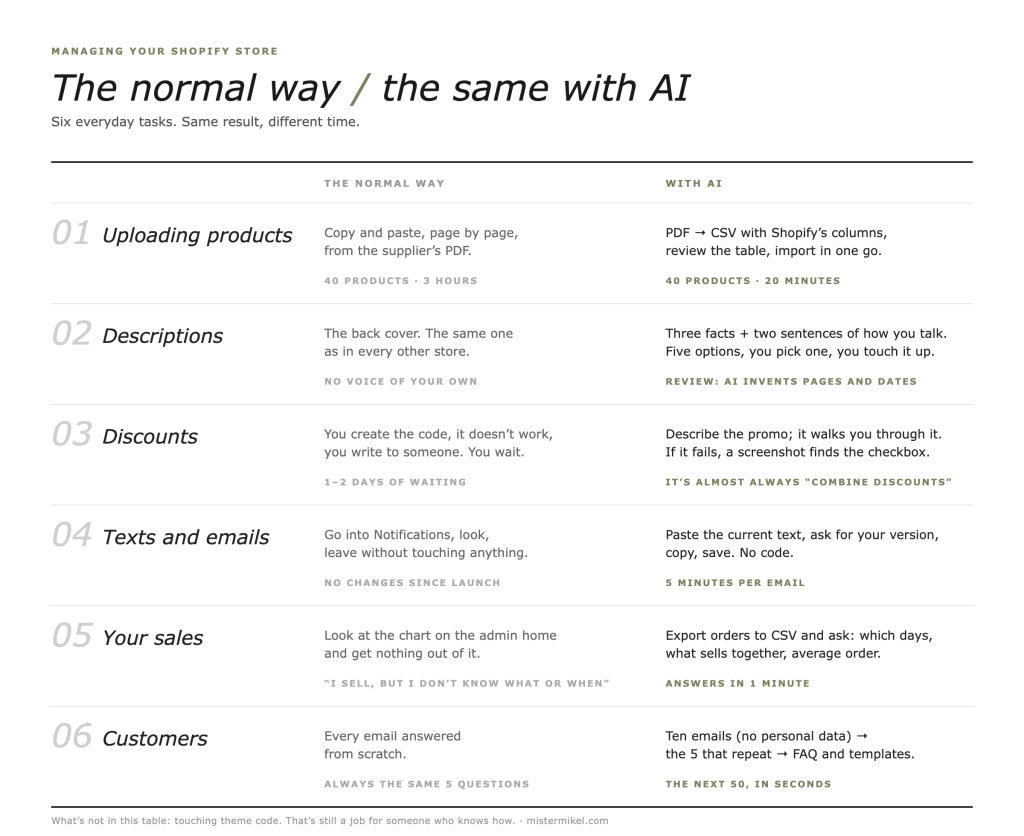
Uploading new products
The normal way: you open each product page, copy the title, price and description from the publisher’s PDF, paste, adjust, next. Forty products, three hours, two pricing errors.
With AI: you give the catalog PDF to the assistant and ask for a CSV with Shopify’s exact import columns (Title, Body HTML, Vendor, Price, SKU, whichever you use). You review the table and import from Products → Import. Forty products, twenty minutes. You catch the errors in the table before they exist.
Writing descriptions
The normal way: copying the back cover. Every store has the same back cover.
With AI: you give it the title, three facts about the product and two sentences showing how you talk. You ask for five short descriptions, pick one and touch it up. Shopify has its own assistant (Shopify Sidekick, inside the admin), but most people end up in ChatGPT: it’s more intuitive, it understands your tone better if you show it, and it isn’t limited to what it knows about the admin.
Careful: always review. AI invents page counts, measurements and edition dates with astonishing confidence.
Discounts, codes and promotions
The normal way: you create the code, it doesn’t work, you write to someone.
With AI: you tell it what you want (“15% off the whole X collection from the 1st to the 15th, not combinable with free shipping”) and ask it to tell you step by step where that’s configured in your admin. If it still doesn’t work, you paste a screenshot of the setup and it tells you which checkbox is wrong. Nine times out of ten it’s the “combine with other discounts” checkbox.
Changing page and email texts
The normal way: fear. Going into Settings → Notifications and leaving without touching anything.
With AI: you paste in the current text of the confirmation email and ask for a version in your voice. Copy, paste, save. There’s no code to break. The same goes for the shipping page, the returns page or the “about us” page.
Understanding your sales
The normal way: looking at the chart on the admin home page and getting nothing out of it.
With AI: you export the last three months’ orders to CSV, hand it over and ask normal questions: “which days do I sell most?”, “which products go together in the same order?”, “what’s my average order value?”. Answers in a minute. This alone changes how you decide the discounts from the previous point.
Customer service
The normal way: answering every email from scratch.
With AI: you give it ten real customer emails (with no personal data) and it pulls out the five questions that keep coming up. You write those five answers once, and put them on an FAQ page and in reply templates. The next fifty you answer in seconds.
Where AI gets you into trouble
This is where the article stops being friendly.
Touching theme code. An assistant will give you Liquid code with total confidence. Sometimes it works. Sometimes it breaks the checkout on a Friday afternoon. If you’re going to try, duplicate the theme first (Online Store → Themes → Duplicate) and work on the copy. And if you don’t know what Liquid is, this task isn’t yours.
Apps that do “everything”. AI will recommend apps by name. Many no longer exist, others have the same name but are something else, and almost all charge a monthly fee. Check the Shopify App Store before installing anything.
Customer data. Don’t paste real names, addresses or emails into an external assistant. Anonymize first. It’s common sense and, in Europe, it’s also the law.
Business decisions. AI will tell you to raise prices, offer free shipping or open a TikTok channel with the same confidence for all three. It’s good for putting your data in order, not for deciding for you.
How to know if this is for you
If you recognize yourself in three of these, yes:
- You write to your developer more than twice a month for things that take five minutes.
- You have products not yet uploaded because “it’s a pain”.
- Your store’s descriptions are the book’s back cover or the supplier’s product sheet.
- You haven’t touched a notification email since the store was built.
- You know you’re selling, but you don’t know what or when.
If you recognize yourself in none, congratulations: either your store is very well set up or you have someone running it. Both are fine.
How we do it
At Mister Mikel we design Shopify online stores for publishers, bookshops, foundations and cultural centers, from Vitoria-Gasteiz, Spain. And there’s one thing we do in all of them: we hand the store over with a “how it’s done” document and a session so the client knows how to manage the day-to-day without us.
It sounds odd for a studio to teach you not to need it. The logic is simple: if every small change goes through us, the store moves at our pace, not yours. And what we want is for it to move.
For what isn’t day-to-day (theme changes, integrations, a new campaign page, migrating large catalogs) we have the development subscription: €950 a month, with no minimum term, for stores that need someone to be there without hiring anyone. You do the small stuff with your assistant. We do the structural stuff. Each to their own.
One more thing: don’t ask AI to be your store
The temptation is to let the assistant write everything. Every product page, every email, every post. The result is a store that sounds like all the others, because all the others are using the same assistant.
Use it for the heavy lifting. The voice is still yours. A book description written by someone who has read the book shows. And in a small store, that it shows is the only advantage you have.
FAQ
Yes, for almost everything that isn’t code: uploading products, writing product pages, setting up discounts, changing page and email texts, analyzing sales and preparing replies to customers. Anything that involves touching the theme (Liquid files, CSS, checkout) still needs someone who knows what they’re doing or, at the very least, a copy of the theme so you don’t break the live store.
Shopify Sidekick is the assistant built into the Shopify admin: it answers questions about your store and takes you to the setting you’re looking for. It’s good for getting started. ChatGPT (or Claude) is more intuitive for the day-to-day: it understands your tone if you give it examples, works with files (PDF catalogs, order exports) and you can ask it the same thing three ways until you get it. In practice, clients who manage their store well use ChatGPT to think and the Shopify admin to execute.
Product data (titles, prices, descriptions), yes. Customer data (names, emails, addresses, identifiable orders), no, unless you anonymize it first. Export, remove the personal columns and then ask. It’s what the GDPR requires and, besides, you don’t need that data to draw useful conclusions.
For the day-to-day, fairly soon. For structural work, never entirely: theme changes, integrations with your invoicing system, catalog migrations, new campaign pages. The difference is that you stop paying to change a text and pay for what really needs someone.